

Issue:
During installation of Autodesk Desktop Connector, the progress bar regresses at a certain point and the installation fails with Error 1603.
Causes:
Error 1603 may occur due to:
- Outdated or corrupted .NET components
- Residual or mismatched Autodesk registry entries from previous installations
The issue is typically confirmed by reviewing the Desktop Connector installation logs.
Solution:
1. Review Installation Logs
Check the installation logs located at:
Open the install.log or journal file and look for entries similar to the following:
Or:
If these lines—or similar errors—are present, proceed with the following steps.
2. Repair .NET and Clean Registry
Step-by-Step Instructions
1. Open Windows Event Viewer.
- Navigate to Windows Logs → Application.
- Look for any .NET Runtime errors.
2. If .NET errors are present:
Uninstall all existing .NET components from the system.
3. Download .NET Runtime 8 (all three components).
- Ensure you download the correct runtime packages for your system.
(Typically includes Runtime, Desktop Runtime, and ASP.NET Core Runtime.)
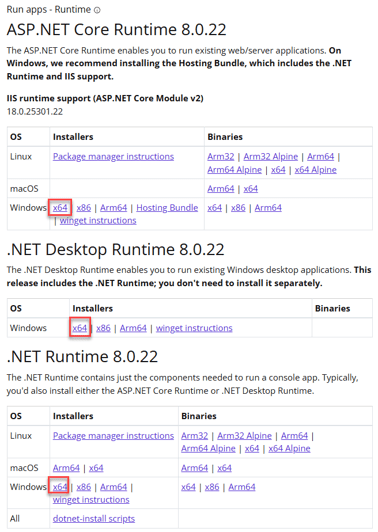
4. Install the newly downloaded .NET Runtime components.
5. Open Registry Editor (Run as Administrator).

6. Search for ‘Autodesk Desktop Connector’ registry entries.
- Delete any remaining entries.
⚠️ Warning: Be careful when editing the registry. Deleting unrelated keys can affect system behavior.
7. Restart the computer.
8. Reinstall Autodesk Desktop Connector.
The installation should now complete successfully.
About the Author
Follow on Linkedin More Content by Gregory Lee


