Inventor 'Not the same file as originally referenced' prompt missing

November 2, 2026 Joanna Gryszka

Issue:

In Inventor you set the prompt 'not the same file as originally referenced. Do you really want to use the resolved document?' to 'Do no show this message again ever'.
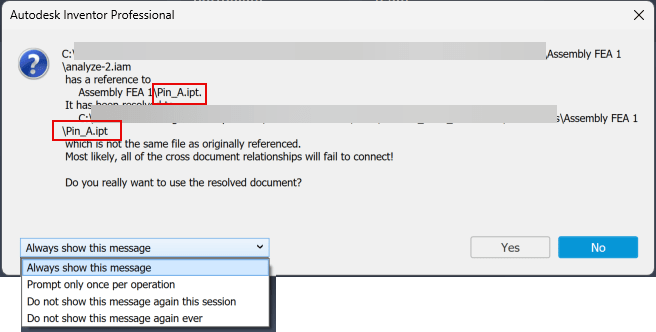
How do you find the prompt to bring it back again.

Solution:

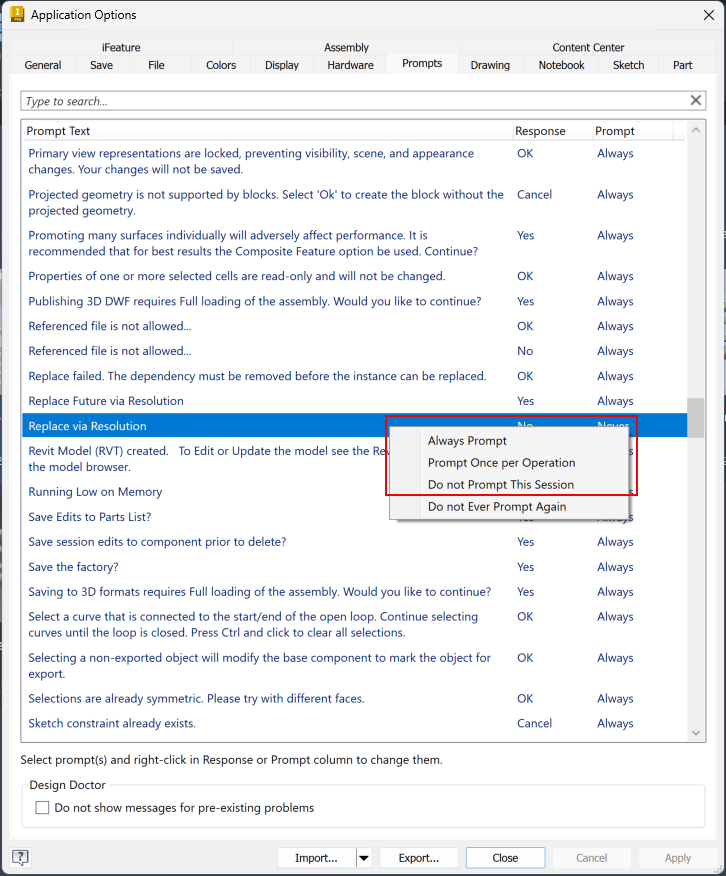
Find the 'Replace via Resolution' prompt in Application Options/Prompts tab.

Right-click and change from 'Never' to 'Always Prompt' or prompt once per operation or session
How to find the internal file ID to compare:

https://resources.imaginit.com/manufacturing-solutions-blog/inventor-what-is-different-than-expected

Other causes for the 'not the same file as originally referenced' error:

https://www.autodesk.com/support/technical/article/caas/sfdcarticles/sfdcarticles/Changing-reference-of-a-derived-part-brings-error-message-in-Inventor.html

In Inventor 2027-some of those dialog box options are not available.  This is fixed in 2027.1:

Some prompt options not available in File resolve dialog in Inventor

About the Author

Joanna Gryszka

Manufacturing Technical Support Specialist<br><br>Joanna has over eight years of experience working with Autodesk products. She started supporting core AutoCAD and network installations of all Autodesk products. She now has five years of experience with Inventor. <br> She graduated from Mechanical Engineering and has been providing solutions to clients and dedicating her knowledge to the Solution Center since then.

More Content by Joanna Gryszka
Previous Article
How to Batch Plot Drawings Using Page Setup Manager in AutoCAD

When batch plotting multiple AutoCAD drawings, each sheet may have different plotting settings. This can re...

Next Article
Vault Backups Fail Due to Replication Errors

Resolving Autodesk Vault Backup failure due to replication issues.

×

Get Tips Delivered.

Subscribe to Email Updates.

First Name
Last Name
Country
Thank you!
Error - something went wrong!