

Issue:
Revit users (2025 and older) experiencing crashing or add-in issues with the latest update of WebView2 installed.
Cause(s):
The WebView2 update from March 2026 introduced a conflict between CEF (Chromium Embedded Framework) used by Revit and WebView2 potentially used by Revit add-ons.
Solution:
Follow the steps below to force the use of an older version of WebView2 in Revit:
- Download WebView2 runtime v145 from this link
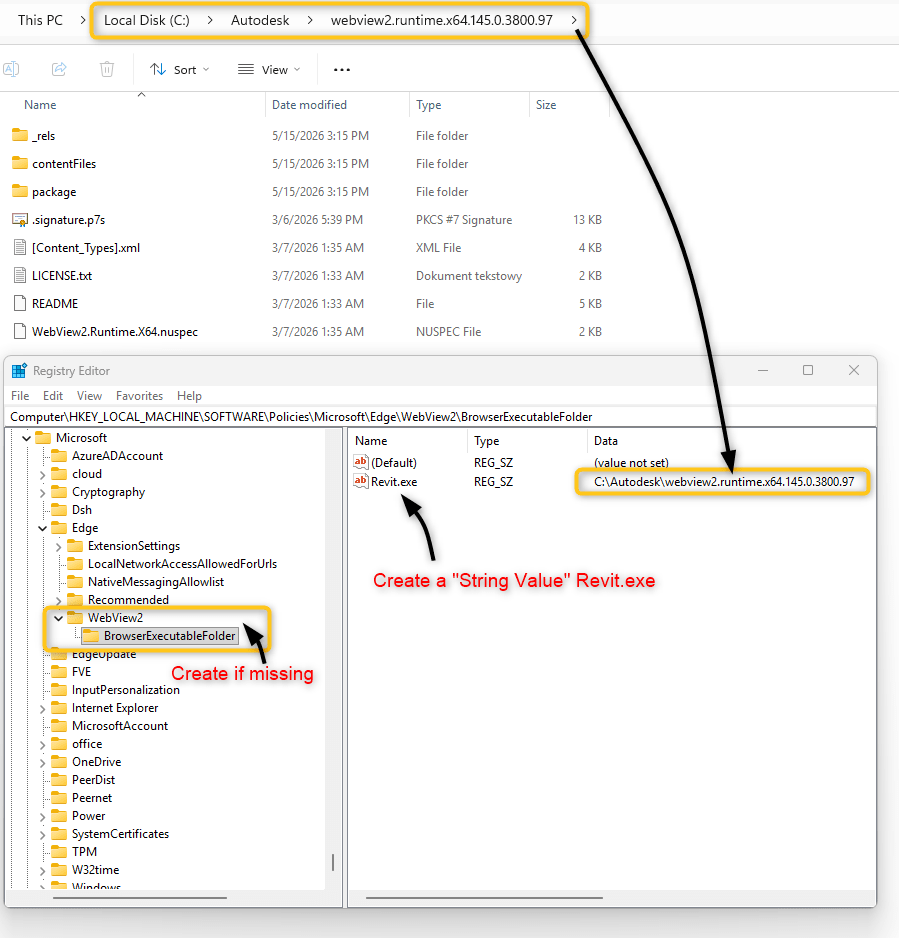
- Extract the runtime content to any accessible folder. (For example: "C:\Autodesk\webview2.runtime.x64.145")
- Open the Registry editor and find: HKEY_LOCAL_MACHINE\SOFTWARE\Policies\Microsoft\Edge\
- If it does not exist, create Keys "WebView2" and then "BrowserExecutableFolder"
- In the "BrowserExecutableFolder" create a String Value "Revit.exe"
- Fill the Value data with the path to the downloaded and extracted WebView2 v145 location.
About the Author
More Content by Jeremy Smith


