

Issue:
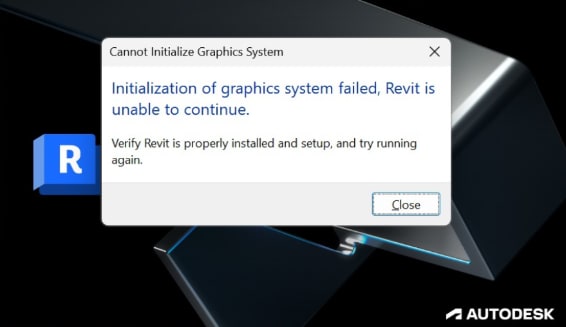
Revit displays the error message:
“Initialization of Graphics System Failed. Revit is unable to continue.”
This occurs when attempting to launch Revit 2024.2.
Causes:
This issue occurs if the user attempts to roll back Revit 2024.2 after installing the 2024.3.1 update.
- Once Revit 2024.3.1 is installed, rolling back to the prior version (Revit 2024.2) corrupts the application’s core files.
- Revit becomes non-functional and will not start, as the rollback process is unsupported for this version.
- The journal file includes following line:
'C 02-Jan-2025 20:03:06.709; DBG_INFO: Loading GrphOGS3 library fails.: line 77 of E:\Ship24.3.1\2024_px64\Source\Foundation\Utility\Managers\OptionalFunctionalityManager.h.
' 0:< TaskDialog "Initialization of graphics system failed, Revit is unable to continue."
Solution:
There is no method to roll back Revit once 2024.3.1 is installed. A clean uninstall and reinstall of earlier versions will not resolve the issue.
To restore Revit functionality:
- Reinstall and update Revit to version 2024.3.1.
- Updating to 2024.3.1 is the only solution to resolve the error.
Key Notes to Avoid the Issue in the Future:
- Avoid rolling back after installing major updates. Autodesk does not support rollbacks for specific updates like 2024.3.1, as they may change critical core components of Revit.
- If you anticipate needing an older version of Revit, keep it installed before applying newer updates.
About the Author
Follow on Linkedin More Content by Gregory Lee


