

Issue:
AutoCAD 2027: When double clicking a DWG AutoCAD no longer respects the last version opened.
AutoCAD 2027 On 1st launch if you select “Always reassociate DWG files with AutoCAD (recommended)” AutoCAD 2027 will be the only AutoCAD that launches when double clicking. No longer respecting the last version opened. This happens even when AClauncher.exe is selected as the default application. Although Autodesk does not officially support double clicking a dwg to open the file. Autodesk recommends opening the product and then opening the dwg file.
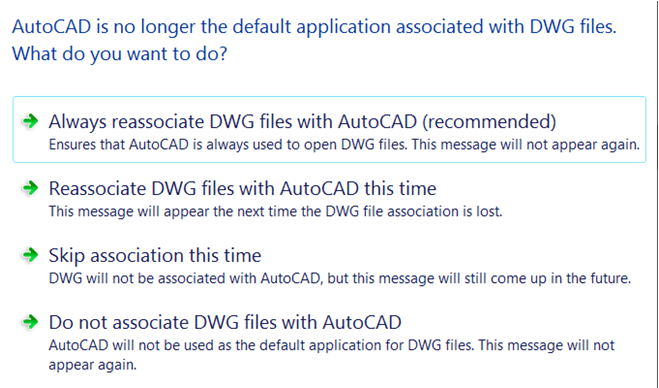
Figure 1
Causes:
Bug is being investigated by Autodesk
Autodesk Devlopment has this under review CPR-2016
Solution:
Select “Do not associate DWG files with AutoCAD”
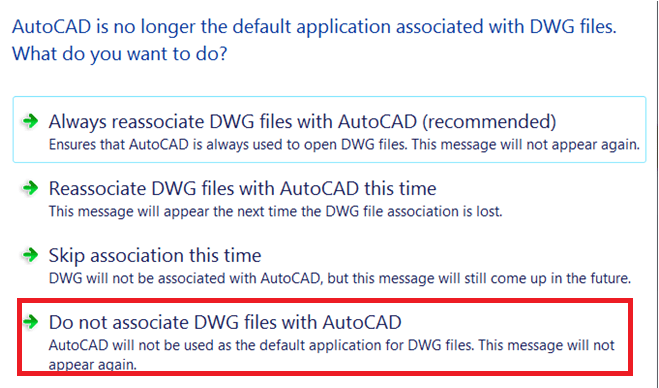
Figure 2
Update from Autodesk (As Designed)
"No issue has been identified and the software is behaving as designed."
After installing Civil 3D 2027, double-clicking a DWG file will always launch Civil 3D 2027 rather than the last version of Civil 3D that was used.
This change was made to help prevent several issues that can occur when opening drawings directly from Windows, including:
• The wrong Autodesk application opening the drawing.
• Inconsistent startup behavior between sessions.
• Missing or incorrectly loaded Civil 3D components.
• Workspace or profile settings not loading as expected.
• Unexpected instability or application crashes.
• New drawings being created with unintended default settings.
By consistently launching Civil 3D 2027 when a drawing is opened through Windows Explorer, these potential issues can be avoided and a more reliable startup experience is provided. It is recommended that users open a drawing within the software. However, we understand that users consistently open a drawing through Windows explorer.
About the Author
Follow on Linkedin More Content by Jeff Arbogast


