

Issue:
During a project, many users find that a family is not taggable because the parameter used is not a shared parameter. To enable tagging, the family parameter needs to be converted to a shared parameter. However, when a parameter is replaced with a shared parameter, all loaded families of the same type reset their parameter values to the family’s default parameter value instead of maintaining the original configuration.
Before:
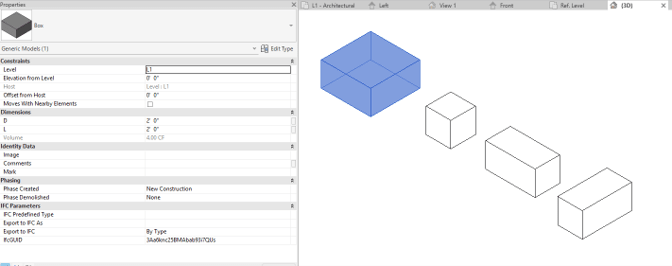
After replacing one of the parameters with a shared parameter:
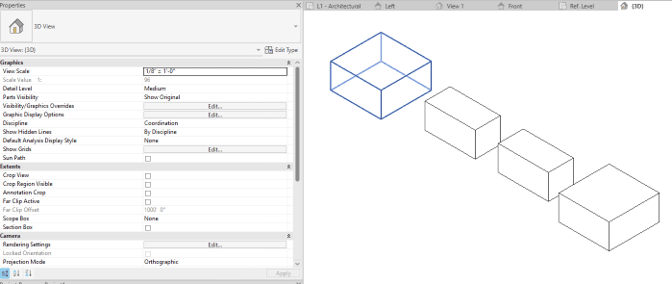
Causes:
A loaded family cannot maintain existing parameter values when a parameter is replaced with a new parameter. When the parameter is replaced in the family and reloaded into the project, all families of the same type inherit the value of the new parameter. This can result in overriding the family’s existing parameter configuration.
Solution:
Reconfiguring families during a project is inefficient and costly. The best workaround for this issue is to use parameter mapping instead of parameter replacement.
1. Create shared parameter in the family editor.
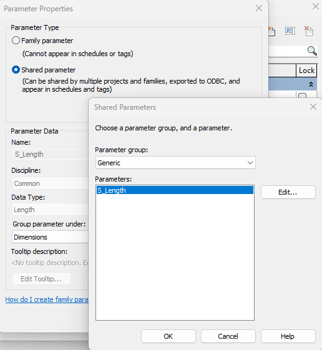
2. Use a formula to map the existing parameter to the shared parameter.
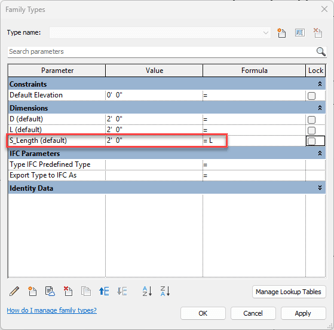
*Make sure to map the existing parameter to the shared parameter, not the other way around.
3. Load the family into the project.
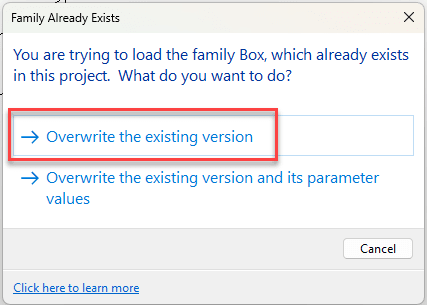
4. When prompted, select Overwrite the existing version.
5. The family can now be tagged using the shared parameter.
About the Author
Follow on Linkedin More Content by Gregory Lee


