Problem:
When opening Revit you receive the following error message.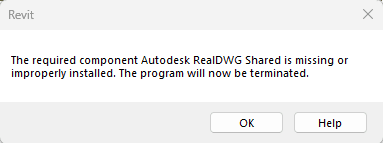
Solutions:
About the Author
Follow on Linkedin More Content by Derek Piccininni


Problem:
When opening Revit you receive the following error message.
Solutions:
About the Author
System Support Analyst
Follow on Linkedin More Content by Derek Piccininni
Get Tips Delivered.
Subscribe to Email Updates.

Updates to Autodesk Account policies

Resolving Autodesk Vault Backup failure due to replication issues.

If you have Autodesk Access installed on your Vault Server, you may have noticed that the update for Vault Server can show up in the Access Utility. What to be aware of.

When starting Inventor users receive a "Failed to initialize a component for accessing AutoCAD files. Please try again. Error 16" message. This is related to the Interoperability Engine Manager.

You have a source file where names have been changed, such as Road Names (alignments), Surface Names, Pipe network names, etc. and you need to update the names in the drawing that consume those items.

2025 and 2026 Products start having crashing issues or failure to open after running recent updates on 2025 or 2026 products


