

Issue:

When trying to add a file to Vault, for example, a PDF, you receive an error indicating that the file already exists in Vault. However, when you search for the file, you are unable to find that file.
Causes:
The context of this error matters, as there can be different causes depending on the circumstances and environment. For the purpose of this blog post, the specific environment is Vault 2026 with the new “Trash Bin” enabled. In this case, the file that is triggering the error is located in the “Trash Bin.”
Solution:
Starting with Vault 2026, a new “Trash Bin” feature has been introduced to allow for the “deletion” of Vault data while minimizing the hazards of completely removing data from your data management system. If you get the “Error 1008” indicating that the file already exists, but you are unable to find the file via searches, check the “Trash Bin” as shown below:
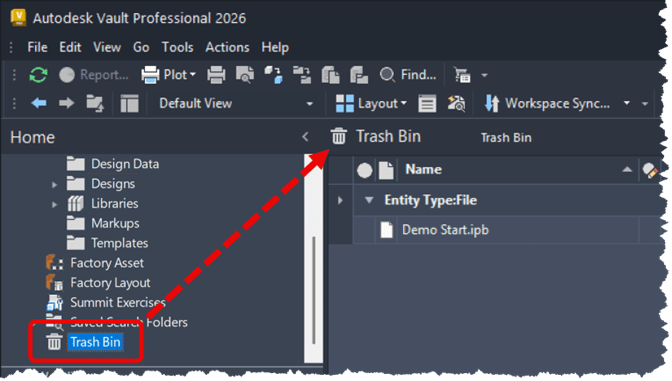
From the “Trash Bin,” users may restore entities that they created, but only Vault Administrators can permanently delete files from the “Trash Bin.” If you find the file that has been triggering the 1008 error, then request that your Vault Administrator permanently deletes the file so you can proceed without further issues.
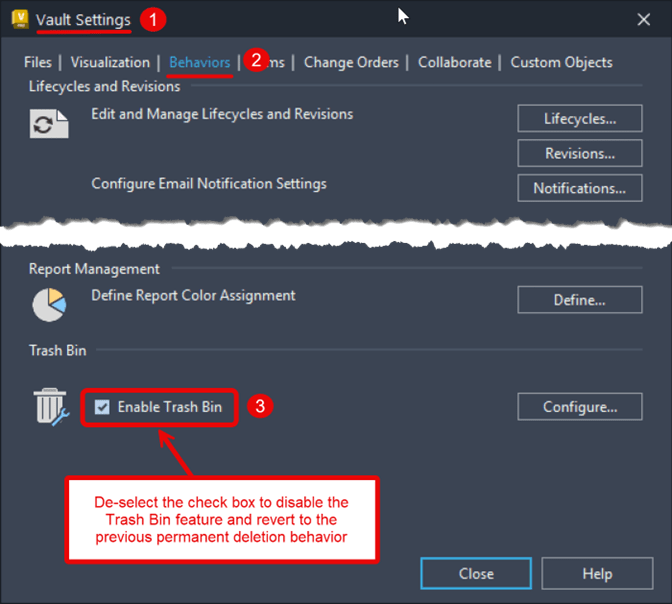
If you find that the “Trash Bin” is becoming a bottleneck in your workflow, you can have a Vault Administrator disable the feature to revert to the traditional permanent deletion behavior.
About the Author
Follow on Linkedin More Content by Heath White


