Revit 2025 and 2026 doesn’t start and nothing happens

July 1, 2026 Gregory Lee

Issue:
When a user starts Revit 2025 or 2026, the application does not start and nothing happens.

Causes:
The root cause of the issue started with a recent Windows update. After the update, it began affecting MSVCP140.dll, causing Revit 2025 and 2026 to fail during initialization.

Solution:
1.     Uninstall Microsoft Visual C++ Redistributable v.14 (both x86 and x64).
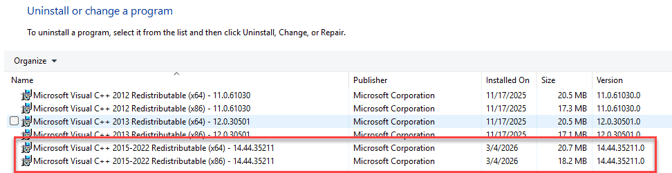
 

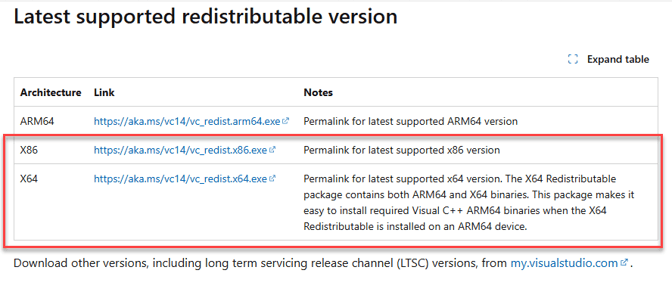
2.     Reinstall Microsoft Visual C++ Redistributable v.14 (both x86 and x64).

Latest supported Visual C++ Redistributable downloads | Microsoft Learn
 

3.     Reboot the computer and restart Revit.


About the Author

Gregory Lee

Sr Technical Support Specialist<br><br> Skilled in AutoCAD, Mixed-use, Renovation, Revit, and Sustainable Design. Strong arts and design professional with a BA in Urban design focused in Architecture from University of Washington.

Follow on Linkedin More Content by Gregory Lee
Previous Article
Desktop Connector Stop Working After the Update

After updating Autodesk Desktop Connector, the application may stop functioning and display the message: “...

Next Article
Revit Project File Version Unknown

Revit file shows the version number is not known. The zip file extension was changed to zip.

×

Get Tips Delivered.

Subscribe to Email Updates.

First Name
Last Name
Country
Thank you!
Error - something went wrong!