

Issue:
Can users postpone an Autodesk Scheduled Update if they are in the middle of critical work or approaching a project deadline?
Solution:
Yes. Users can postpone a scheduled Autodesk update if it is scheduled within the next 24 hours and they need additional time to complete important work or meet a project deadline.
To postpone an update, open Autodesk Access, select the ellipsis (...) next to the scheduled update, and choose to defer the installation until the following day.
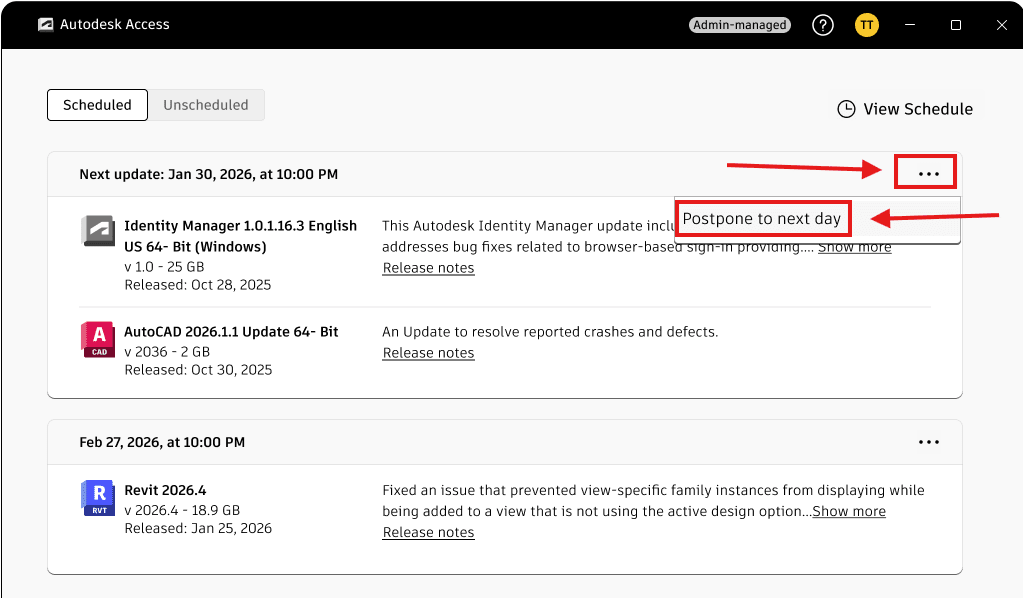
This postponement option is available for up to three consecutive days.
After the third postponement, the update can no longer be deferred. The scheduled update will proceed on the third day, and the Autodesk product must be closed to allow the update to install successfully.
Note: While an update is being installed, users will not be able to open the Autodesk product until the update process has completed.
About the Author
Follow on Linkedin More Content by Ken Williams


