How to silently install Autodesk Products updates

June 11, 2026 Ken Williams

Issue: 

I need to install Autodesk updates silently using a batch file.

Solution:

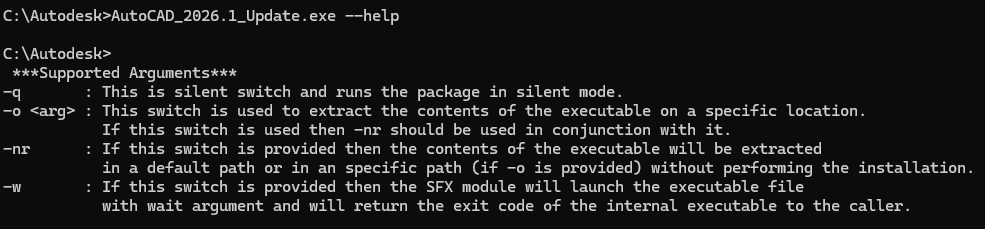
To install Autodesk updates silently, use the -q switch.

Create a batch file and point to the Autodesk update, and add the -q:

example: \\networkshare\foldername\AutoCAD_2026.1_Update.exe -q

 Here are the switches\Arguments for Autodesk Updates:
About the Author

Ken Williams

Installation Technical Support Specialist<br><br>Ken Williams has over 20 years of experience as a systems administrator helping organizations with installation, configuration, and maintenance. At IMAGINiT, Ken puts his knowledge of Microsoft, SQL, servers, and Autodesk to work ensuring clients are able to stay up-and-running, install their software easily, and maintain their solutions.

Follow on Linkedin More Content by Ken Williams
Previous Article
The newest version of Revit is not available for download in the Autodesk Portal

Next Article
Plant 3D Report Creator Sorting issue

When using Report Creator to preview pipe runs with the 3D Parts template, the report groups all pipes and ...

×

Get Tips Delivered.

Subscribe to Email Updates.

First Name
Last Name
Country
Thank you!
Error - something went wrong!