

Applies to:
All AutoCAD 2027-base Products
Issue:
When opening drawings created in previous versions of AutoCAD in 2027, single-line text contained within blocks display distorted character spacing. The text displays correctly in 2026 and earlier versions, but the spacing changes in 2027. Multiline text within the block works fine. The distorted character spacing issue may also randomly affect single-line text in the project outside the block.

Causes:
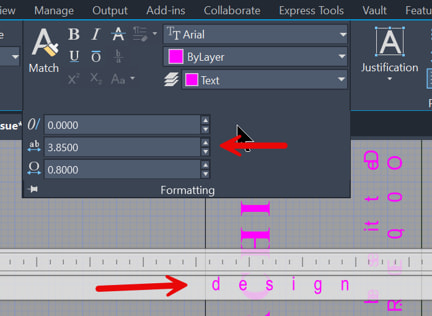
After some research, I determined that the cause was the Tracking setting in the Multiline Text editor. The Autodesk defect number is CPR-1874.
Solution:
To resolve this issue, set the Tracking value to 1, or explode the MText to single-line text. When the MText is exploded, the Tracking value is automatically reset to 1. The only other option is to continue using AutoCAD 2026 or earlier until the issue is addressed in AutoCAD 2027.
About the Author
Follow on Linkedin More Content by Paul Sills


