Opening Survey Database Causes Fatal Error

July 13, 2026 Ryan Wunderlich

Applies to:
All Civil 3D Versions

Issue:
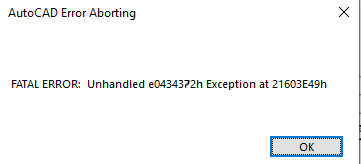
Opening a Survey database for Edit, or creating a new one causes Civil 3D to hang and fatal error with an e0434372 code at some hex code
Causes:
This problem is specific to deployment-based installations and is due to two (2) DLL’s being placed in the wrong directory

Solution:
The solution is fairly simple, navigate to the root directory of the product (typically C:\Program Files\Autodesk\AutoCAD 202x\
See if the following two files are in that directory:
SQLite.Interop.dll
System.Data.SQLite.dll

If they exist in the root directory, rename them to .old from .dll, then reopen Civil 3D and retest. This is the typical fix when this occurs.

About the Author

Ryan Wunderlich

Support Team Manager - AEC Team<br><br>An AutoCAD Certified Professional, Ryan is responsible for taking client cases and assisting with issues with the software - everything from regular glitches to software deployments and whatever else goes wrong. He's proficient in AutoCAD-based software, Revit, Navisworks, 3ds Max, customization of software and deployments, LISP and VBA Coding

Follow on Linkedin More Content by Ryan Wunderlich
Previous Article
Conceptual Visual Styles Quality

When the Visual Style is set to Conceptual, the view quality appears rough. Additionally, the model has som...

Next Article
AutoCAD PDF Underlays Plot Fuzzy

Plotting to PDF with PDF underlays that plot as raster images and how to fix that

×

Get Tips Delivered.

Subscribe to Email Updates.

First Name
Last Name
Country
Thank you!
Error - something went wrong!