

Issue:
When creating a Microsoft Intune application deployment for an Autodesk product, you may need the MSI Product Code to configure a detection rule. Without the correct Product Code, Intune cannot accurately determine whether the application is installed on a device.
Solution:
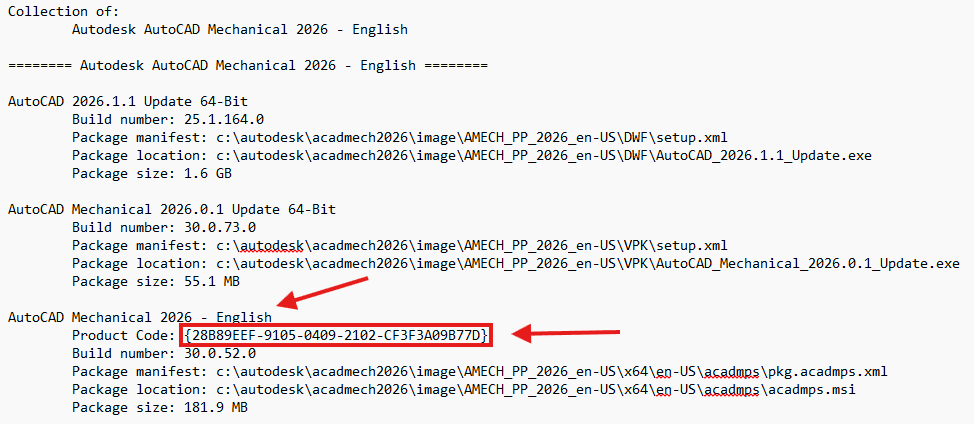
The Autodesk MSI Product Code can be found in the Summary.txt file that is created as part of the Autodesk deployment image.
To locate the Product Code:
- Browse to the Autodesk deployment image folder.
- Open the Summary.txt file.
- Locate the section that references the Autodesk product being deployed.
- Identify the Product Code associated with the application.
- Copy the Product Code and use it when configuring the MSI Detection Rule in Microsoft Intune.
Using the Product Code from the deployment's Summary.txt file helps ensure that Intune accurately detects the Autodesk application after installation. This method is often quicker and more reliable than searching the Windows Registry or querying installed applications on a reference machine.
The following example shows where to find the Product Code for AutoCAD Mechanical 2026 within the Summary.txt file:
About the Author
Follow on Linkedin More Content by Ken Williams


