Inventor-show Model State scope in title bar

Issue:

Inventor 2026's title bar can now show the Model State scope after the active Model State name.

The scope displays whether you're editing All or Multiple model state members.

This can be useful to quickly see if you're editing all members in factory mode, a single member or multiple members.

Solution:

To enable or disable this, select the new 'Show Model State Scope' option in Application Options on the General tab:
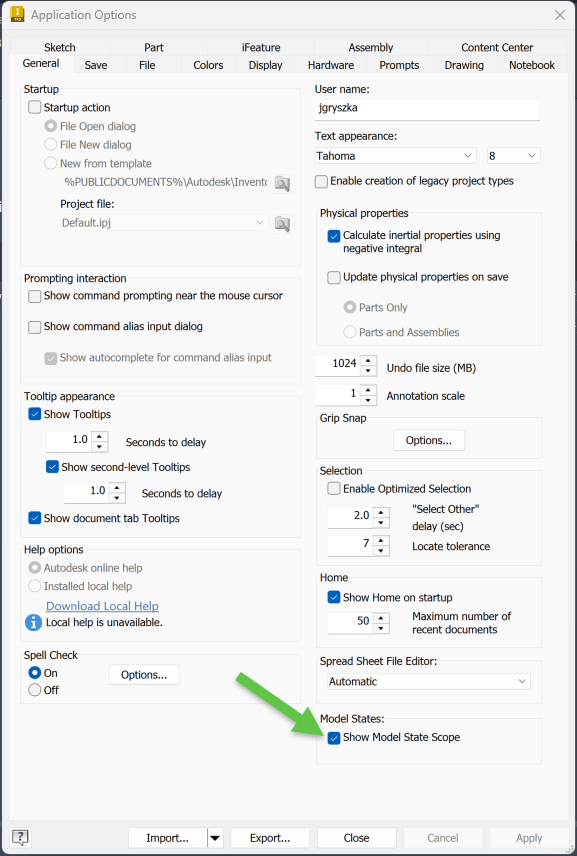
The Inventor title bar displays -All  if in Editing All Members mode:

-Multiple if editing more than one member in Editing Multiple Members mode:

Editing a Single Member, no suffix is added.

To toggle member scope in the Model Browser: https://help.autodesk.com/view/INVNTOR/2026/ENU/?guid=GUID-85FDBAB9-7618-43B5-AE6E-F8D21F5FB22B

Model State enhancements in Inventor 2026: https://help.autodesk.com/view/INVNTOR/2026/ENU/?guid=INV2026-MODEL-STATES

About the Author

Joanna Gryszka

Manufacturing Technical Support Specialist<br><br>Joanna has over eight years of experience working with Autodesk products. She started supporting core AutoCAD and network installations of all Autodesk products. She now has five years of experience with Inventor. <br> She graduated from Mechanical Engineering and has been providing solutions to clients and dedicating her knowledge to the Solution Center since then.

More Content by Joanna Gryszka
Previous Article
Inventor: Inventor latency after migration

After migration Inventor is slower than before, opening inventor, creating a new drawing, home page, among ...

Next Video
New Manufacturing Features and Workflows that are Changing the Way We Work

Manufacturing technology is evolving fast, and Autodesk is leading the change. In this video, IMAGINiT expe...

Inventor Classes Now Available

Check Schedule