Inventor 2026 open Project Settings

Issue:

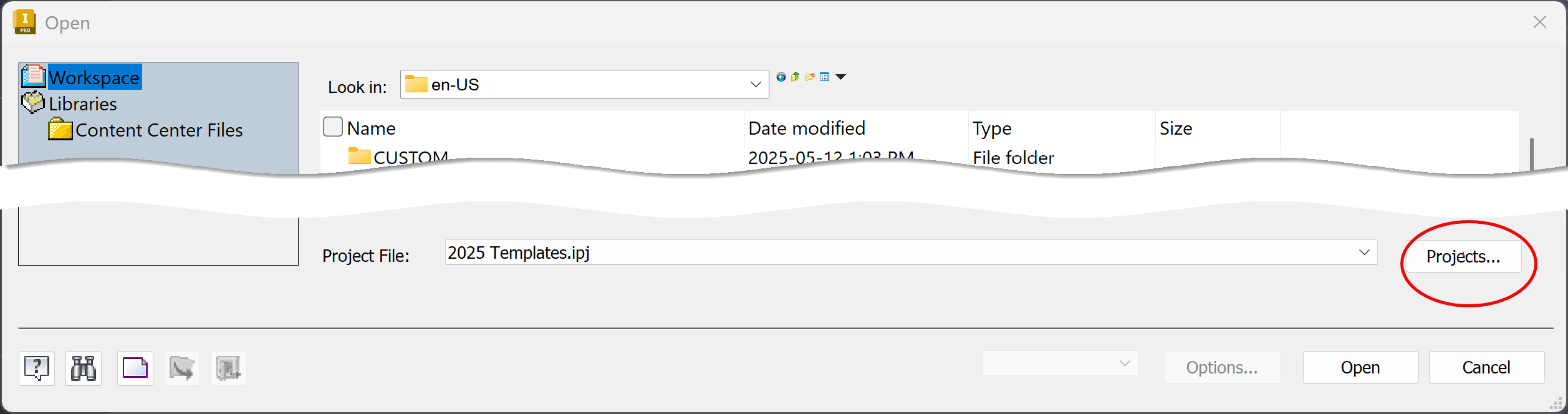
How do you access the Projects dialog box in the Inventor file Open dialog box in 2026. 

There's no Projects button at the bottom right.
Solution:

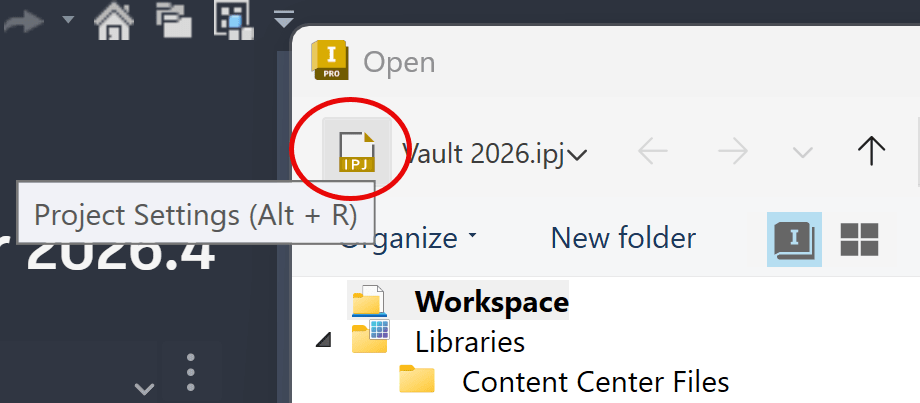
In Inventor 2026 open the Projects from the IPJ icon at the top left of the Open dialog box.  This is part of the Open and Save enhancements:https://help.autodesk.com/view/INVNTOR/2026/ENU/?guid=INV2026-SAVE-ENHANCEMENT
Or to open Projects from the Home tab, use the Project and Settings button: https://resources.imaginit.com/support-blog/inventor-2023-project-file

About the Author

Joanna Gryszka

Manufacturing Technical Support Specialist<br><br>Joanna has over eight years of experience working with Autodesk products. She started supporting core AutoCAD and network installations of all Autodesk products. She now has five years of experience with Inventor. <br> She graduated from Mechanical Engineering and has been providing solutions to clients and dedicating her knowledge to the Solution Center since then.

More Content by Joanna Gryszka
Previous Article
Inventor Error: Failed to Initialize a Component

When starting Inventor users receive a "Failed to initialize a component for accessing AutoCAD files. Pleas...

Next Article
Changing the Installation Location of Inventor SDK User Tools

Issue: You want to install Inventor SDK  UserTools.msi somewhere other than the default location.

Inventor Classes Now Available

Check Schedule