Fabrication Oval to Rectangle fitting Grayed out in Revit

Issue:
In the current Fabrication CADmep content, the tap for an oval main to a rectangular branch does not exist. Creating an oval to rectangular takeoff works correctly within Fabrication CADmep; however, the part becomes grayed out when the service is loaded into Revit.
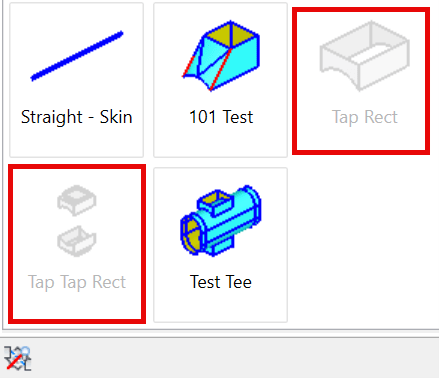


Causes:
When using CID 342 and 343 to create a tap, setting Pipe Part to No Pipe under Options causes the part to appear grayed out in Revit. This behavior corresponds to Autodesk Issue ID CPR 1569.
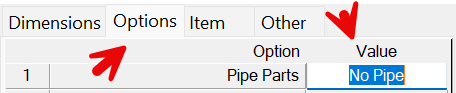
 

Solution:
Currently, the only option is to use the fitting as a tee (similar to Test Tee) rather than as a tap.
How to create a fabrication part for use in Revit
https://resources.imaginit.com/support-blog/using-cid-templates-for-revit-fabrication-parts 

About the Author

Paul Sills

Sr. Support Specialist<br><br>Paul is responsible for client technical support as well as the set-up and configuring of plotters; support and service calls; and the installation, demonstration, and education of clients in AutoCAD, AutoCAD Architecture, AutoCAD MEP, AutoCAD P&ID, Advance Steel, Navisworks, Raster Design, Revit Architecture, Revit MEP, Revit Structure and 3D Studio MAX. He draws upon his years of experience as a technical engineer to assist customers in the creation and implementation of standards, the set-up of plotter and pen styles and the creation of custom blocks.

Follow on Linkedin More Content by Paul Sills
Previous Article
Dimensions - Using Different Suffixes in same style

Create a dimension style that uses a foot mark suffix for linear dimensions and no suffix for radius or dia...

Next Article
Vault: Resolving 500 – Internal Server Error

Issue: After switching from HTTP to HTTPS users started receiving 500 – Internal Server Error. Here's what ...

Need tech support? Let us help!

Learn More