

Applies to:
All AutoCAD Architecture or AutoCAD MEP Products 2024 or older.
Issue:
You are using AutoCAD Architecture or AutoCAD MEP 2024 or older in an environment that uses Vault and cannot enable Sheet Set features when using Sheet sets.
Causes:
This problem is specific to AutoCAD Architecture or AutoCAD MEP product years 2024 and older and requires a registry change to enable that functionality.
Solution:
Open the Registry Editor and navigate to the key for your product:
Architecture 2022: HKEY_CURRENT_USER\Software\Autodesk\AutoCAD\R24.1\ACAD-5104:409\Profiles\
Architecture 2023: HKEY_CURRENT_USER\Software\Autodesk\AutoCAD\R24.2\ACAD-6104:409\Profiles\
Architecture 2024: HKEY_CURRENT_USER\Software\Autodesk\AutoCAD\R24.3\ACAD-7104:409\Profiles\
MEP 2022: HKEY_CURRENT_USER\Software\Autodesk\AutoCAD\R24.1\ACAD-5106:409\Profiles\
MEP 2023: HKEY_CURRENT_USER\Software\Autodesk\AutoCAD\R24.2\ACAD-6106:409\Profiles\
MEP 2024: HKEY_CURRENT_USER\Software\Autodesk\AutoCAD\R24.3\ACAD-7106:409\Profiles\
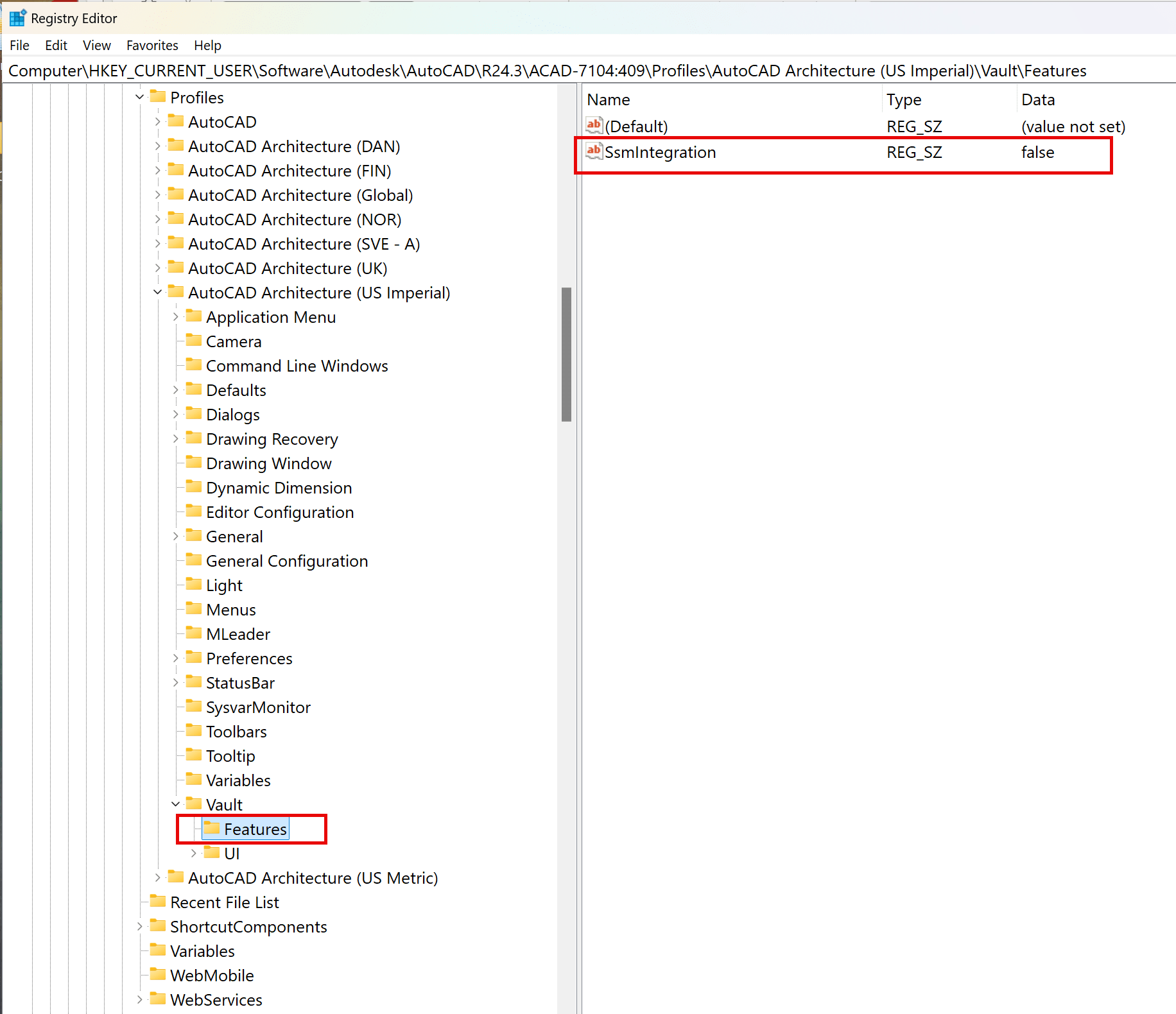
Locate the Profile you are using and expand that down until you locate the Vault Key, then Expand out and select Features. Locate the SsmIntegration key and change the value from false to true:
Warning! Problems caused by improperly editing the Windows registry could render your computer/operating system unusable. Microsoft provides a wealth of critical information that you need to know about the registry in the Microsoft Knowledge Base. Use the Microsoft® Registry Editor only at your own risk and only after backing up the registry as well as the system.dat and user.dat files as outlined for your operating system in the Microsoft Knowledge Base. Additional information about the registry is also contained in the Help topics in the Microsoft Registry Editor.
About the Author
Follow on Linkedin More Content by Ryan Wunderlich


