Text Character Spacing issue in AutoCAD 2027

Applies to:
All AutoCAD 2027-base Products

Issue:
When opening drawings created in previous versions of AutoCAD in 2027, single-line text contained within blocks display distorted character spacing. The text displays correctly in 2026 and earlier versions, but the spacing changes in 2027. Multiline text within the block works fine. The distorted character spacing issue may also randomly affect single-line text in the project outside the block.

Causes:
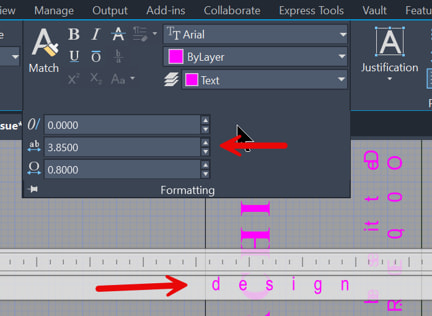
After some research, I determined that the cause was the Tracking setting in the Multiline Text editor. The Autodesk defect number is CPR-1874.
 

Solution:
To resolve this issue, set the Tracking value to 1, or explode the MText to single-line text. When the MText is exploded, the Tracking value is automatically reset to 1. The only other option is to continue using AutoCAD 2026 or earlier until the issue is addressed in AutoCAD 2027.

About the Author

Paul Sills

Sr. Support Specialist<br><br>Paul is responsible for client technical support as well as the set-up and configuring of plotters; support and service calls; and the installation, demonstration, and education of clients in AutoCAD, AutoCAD Architecture, AutoCAD MEP, AutoCAD P&ID, Advance Steel, Navisworks, Raster Design, Revit Architecture, Revit MEP, Revit Structure and 3D Studio MAX. He draws upon his years of experience as a technical engineer to assist customers in the creation and implementation of standards, the set-up of plotter and pen styles and the creation of custom blocks.

Follow on Linkedin More Content by Paul Sills
Previous Article
LTSCALE command causes screen to appear blank in AutoCAD 2027

After using the LTSCALE command in a viewport window, the screen blanks out and does not regenerate automat...

Next Article
Autodesk Assistant - Standards Checker

Autodesk Assistant Tech Preview can run a report of drawing standards deviations.

AutoCAD Tips with
Ryan Wunderlich
Aug 21

Register Now