AutoCAD 2025 Multileader Not Keeping Layer When Adding a Leader Leg

Applies to:
All AutoCAD-based 2025 Products

Issue:
When adding an additional leg to a Multileader, the layer changes to the current layer instead of keeping the original layer of the multileader.

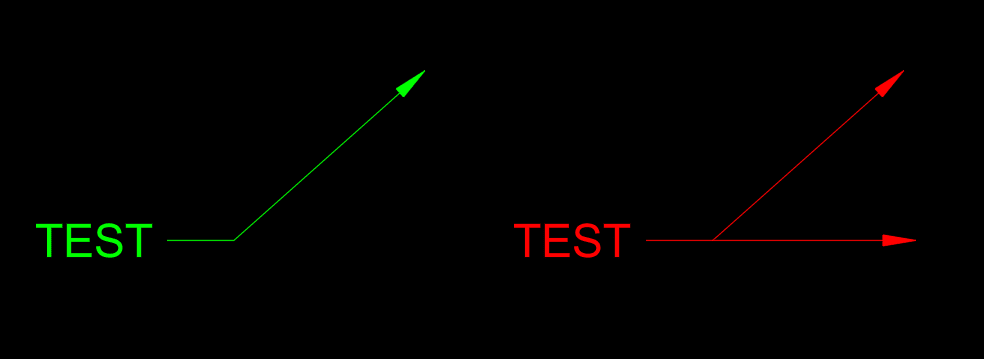


Causes:
This is a defect specific to AutoCAD 2025 products and is not present in any other version.

Solution:
The only solution at this time is to make sure the layer that the multileader is on is set current before adding additional leader legs or you can change the multileader back to the correct layer after adding additional leader legs.

About the Author

Ryan Wunderlich

Support Team Manager - AEC Team<br><br>An AutoCAD Certified Professional, Ryan is responsible for taking client cases and assisting with issues with the software - everything from regular glitches to software deployments and whatever else goes wrong. He's proficient in AutoCAD-based software, Revit, Navisworks, 3ds Max, customization of software and deployments, LISP and VBA Coding

Follow on Linkedin More Content by Ryan Wunderlich
Previous Article
How to Batch Plot Drawings Using Page Setup Manager in AutoCAD

When batch plotting multiple AutoCAD drawings, each sheet may have different plotting settings. This can re...

Next Article
How to Fix the "Sync Failed" Error in AutoCAD Electrical

This is a database conflict and data-link timing exception between the 2D schematic environment and the 3D ...

AutoCAD User Group

Dec 18

Register Now