Problem:
When opening Revit you receive the following error message.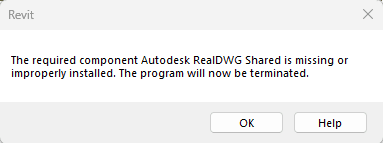
Solutions:
About the Author
Follow on Linkedin More Content by Derek Piccininni


Problem:
When opening Revit you receive the following error message.
Solutions:
About the Author
System Support Analyst
Follow on Linkedin More Content by Derek Piccininni
Revit Classes Now Available
Check Schedule
IMAGINiT Clarity has saved AEC firms more than 5 million hours through automation. See how repetitive Revit tasks add up and what teams gain back.
 53:40
53:40Learn how AEC and FM teams can better align Revit deliverables with real Owner expectations, operational needs, and handover requirements. In this webcast, we'll discuss: • Common gaps between AEC
 43:21
43:21Improve coordination between Bluebeam Revu and Autodesk Revit with a more connected redline workflow. In this Bluebeam Spotlight session, see how the Bluebeam Revit integration can help project teams
 47:45
47:45This session explores practical updates designed to improve design, coordination, and production workflows through AI-powered tools, connected cloud data, and workflow enhancements.
 39:18
39:18Explore the latest updates in Autodesk Forma and Revit, showing how firms can accelerate planning, improve collaboration, and connect conceptual design to BIM.

Explore how Autodesk Forma helps teams connect early building design, site context and analysis with Revit for a more continuous design workflow.
 0:32
0:32IMAGINiT Clarity has officially surpassed 5 million AEC project hours saved through automation. From automated PDF and Navisworks tasks to Revit data extraction, Clarity helps AEC teams reduce repeti

Issue: Users reported an issue where hyperlinks in views/callout tags are no longer included after plotting to PDF from Revit.

Revit stops working after new license manager update.

Learn why BIM metadata matters as much as the model itself and how the right information supports facility management and long-term building operations.

Learn how to create Revit deliverables that go beyond contract requirements and better support owners, facility teams, and long-term building operations.

Explore the latest Autodesk Forma Site Design updates, including AI-powered design tools, Revit 2027 integration, Building Design, and enhanced site analysis.

Issue: I need to download the Revit content and family libraries or extra Revit content.

Revit 2025 hangs while opening a project file after installing Autodesk Desktop Connector version 2027.0.0.29.

Autodesk product crash when starting the program. License manager issue warning shows up after crashing Revit. Nothing happens when user try to run Revit.

Revit file shows the version number is not known. The zip file extension was changed to zip.

Outlines the correct process to Export pipe networks (pressure and Gravity) from Civil 3D to IFC file format for use/consumption in Revit or other programs that can use IFC

You must create a custom Revit.ini and replace the existing with the new Revit.ini

Explore the most impactful Revit 2027 updates, including AI-powered workflows, rules-based numbering, improved documentation controls, and Autodesk Forma integration.
