Content Catalog stops connecting to Revit

Issue:
Content Catalog browser is not connecting to Revit.

Causes:
When a user opens Content Catalog from Revit, the Content Catalog browser shows that it is not connected to the current Revit project. This occurs because app permissions are not enabled in the settings.

Solution:
1.     Open Content Catalog using the Chrome browser.

2.     Open Web Access Settings.

 

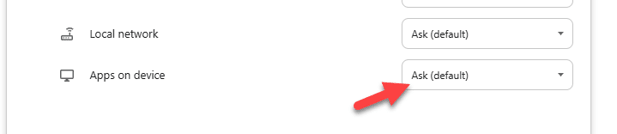
3.     Set Apps on Device to Allow.
 

4.     Close both the browser and Revit.

5.     Reopen the Revit project and launch Content Catalog using Chrome.

About the Author

Gregory Lee

Sr Technical Support Specialist<br><br> Skilled in AutoCAD, Mixed-use, Renovation, Revit, and Sustainable Design. Strong arts and design professional with a BA in Urban design focused in Architecture from University of Washington.

Follow on Linkedin More Content by Gregory Lee
Previous Article
Forma Upgrading Revit Project

Forma: Upgrading Revit Project

Next Article
You Don't Need to Be an AI Expert to Put AI to Work in BIM

Discover how BIM professionals can use AI to automate repetitive Revit tasks, improve workflows, and put th...

Revit Classes Now Available

Check Schedule