

Issue:
IMAGINiT Vault Server Utilities: Warning The installed versions of the Vault Explorer DLLs are not the same as those distributed with Vault Utilities.
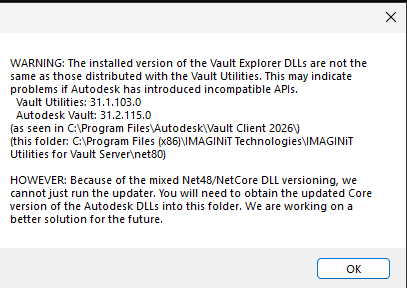
Figure 1
Causes:
Vault Updates.
Solution:
This error normally happens because of a Vault Update. Updates can update the DLL’s and thus they no longer match.
How to correct this error
1. Go to C:\Program Files\Autodesk\Vault Client 2026 <or your version if different>\explorer.
2. Copy these DLL’s
AdskIdentitySDK.dll
AdsdLicensingSDK_9.dll
Autodesk.Connectivity.Explorer.Extensibility.dll
Autodesk.Connectivity.Explorer.ExtensibilityTools.dll
Autodesk.Connectivity.Extensibility.Framework.dll
Autodesk.Connectivity.JobProcessor.Extensibility.dll
Autodesk.Connectivity.LicenseWrapper.dll
Autodesk.Connectivity.WebServices.dll
Autodesk.Connectivity.WebServices.WCF.dll
Autodesk.DataManagement.Client.Framework.dll
Autodesk.DataManagement.Client.Framework.Forms.dll
Autodesk.DataManagement.Client.Framework.Vault.dll
Autodesk.DataManagement.Client.Framework.Vault.Forms.dll
DevExpress.Data.Desktop.v24.1.dll
DevExpress.Data.v24.1.dll
DevExpress.Drawing.v24.1.dll
DevExpress.Office.v24.1.Core.dll
DevExpress.Pdf.v24.1.Core.dll
DevExpressPdf.v24.1.Drawing.dll
DevExpress.Printing.v24.1.Core.dll
DevExpress.RichEdit.v24.1.Core.dll
DevExpress.Sparkline.v24.1.Core.dll
DevExpress.Utils.v24.1.dll
DevExpress.XtraBars.v24.1.dll
DevExpress.XtraEditors.v24.1.dll
DevExpress.XtraGrid.v24.1.dll
DevExpress.XtraLayout.v24.1.dll
DevExpress.XtraNavBar.v24.1.dll
DevExpress.XtraPrinting.v24.1.dll
DevExpress.XtraTreeList.v24.1.dll
Ljwhost.dll
Newtonsoft.json.dll
System.Reflection.MetadataLoadContext.dll
System.Runtime.InteropServices.RuntimeInformation.dll
System.ServiceModel.Http.dll
System.ServiceModel.Primitives.dll
3. Place the copy of the DLL’s in this folder overwriting the existing DLL’s. C:\Program Files (x86)\IMAGINiT Technologies\IMAGINiT Utilities for Vault server 2026 <or your version if different>\net80
Now test the IMAGINiT Utilities for Vault Server again.
Note: In case of an issue backup the existing DLL’s so you can put these back if there is an issue.
About the Author
Follow on Linkedin More Content by Jeff Arbogast


