

Applies to:
All AutoCAD-based Products
Issue:
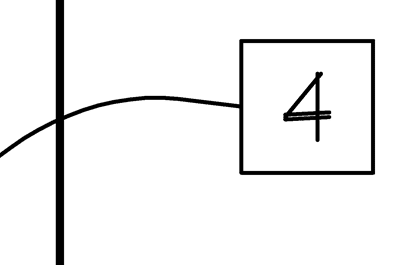
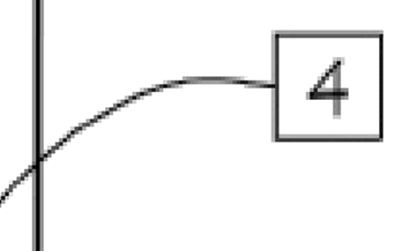
Plotting with a PDF underlay results in the PDF being either fuzzy or unreadable (pixelated)
View in AutoCAD:
Plotted PDF of same area:
Causes:
PDF files attached as PDF Underlays in AutoCAD-based products are treated as referenced underlay objects rather than native DWG geometry. When plotting with the built-in PDF plot drivers, PDF underlays typically are processed through the rasterization pipeline, even if the source PDF contains vector content.
Solution:
There are two options to help with that issue:
Option 1:
If maintaining vector output/quality is required, you should convert the PDF content into native AutoCAD entities using the PDFIMPORT command, as native DWG objects can be plotted as vector geometry
Option 2:
If the PDF is a mix of Raster and Vector and PDFIMPORT doesn’t give you the desired results, then you will need to increase the PDF plotter raster DPI to a higher value
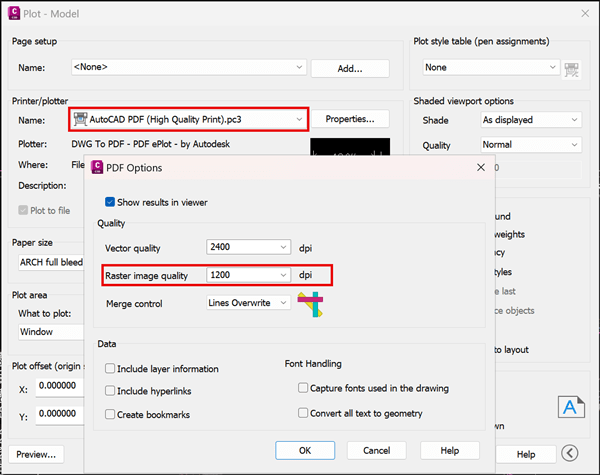
WARNING: Increasing the DPI of the raster Image Quality can increase the size of the PDF significantly, so go up in steps until you have a usable PDF and something small enough to be useful.
About the Author
Follow on Linkedin More Content by Ryan Wunderlich


