Fabrication Oval to Rectangle fitting Grayed out in Revit

Issue:
In the current Fabrication CADmep content, the tap for an oval main to a rectangular branch does not exist. Creating an oval to rectangular takeoff works correctly within Fabrication CADmep; however, the part becomes grayed out when the service is loaded into Revit.
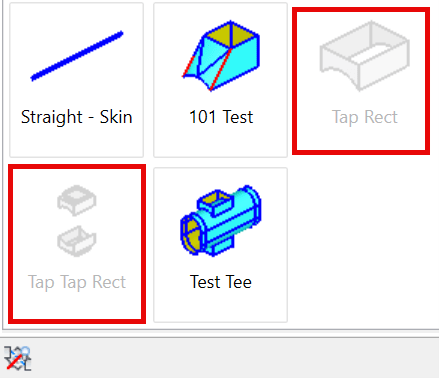


Causes:
When using CID 342 and 343 to create a tap, setting Pipe Part to No Pipe under Options causes the part to appear grayed out in Revit. This behavior corresponds to Autodesk Issue ID CPR 1569.
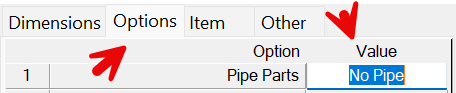
 

Solution:
Currently, the only option is to use the fitting as a tee (similar to Test Tee) rather than as a tap.
How to create a fabrication part for use in Revit
https://resources.imaginit.com/support-blog/using-cid-templates-for-revit-fabrication-parts 

About the Author

Paul Sills

Sr. Support Specialist<br><br>Paul is responsible for client technical support as well as the set-up and configuring of plotters; support and service calls; and the installation, demonstration, and education of clients in AutoCAD, AutoCAD Architecture, AutoCAD MEP, AutoCAD P&ID, Advance Steel, Navisworks, Raster Design, Revit Architecture, Revit MEP, Revit Structure and 3D Studio MAX. He draws upon his years of experience as a technical engineer to assist customers in the creation and implementation of standards, the set-up of plotter and pen styles and the creation of custom blocks.

Follow on Linkedin More Content by Paul Sills
Previous Video
Clarity 2027 BETA
Clarity 2027 BETA

In this session, we walk through what’s coming in the Clarity 2027 release, with a focus on enhancements sh...

Next Article
Using CID templates for Revit Fabrication parts

Revit does not include a built in feature that allows users to create new fabrication parts from scratch. T...

Revit Classes Now Available

Check Schedule