

Issue:
I need to install Autodesk updates silently using a batch file.
Solution:
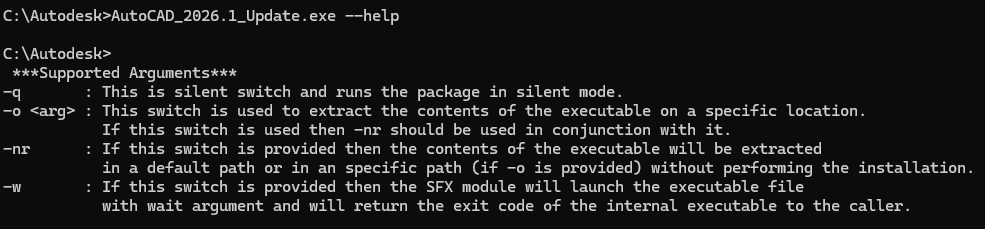
To install Autodesk updates silently, use the -q switch.
Create a batch file and point to the Autodesk update, and add the -q:
example: \\networkshare\foldername\AutoCAD_2026.1_Update.exe -q
Here are the switches\Arguments for Autodesk Updates:
About the Author
Follow on Linkedin More Content by Ken Williams
![Failed to retrieve a Autodesk Vehicle Tracking license [Error code 3- this product has not been registered with the licensing service yet]](https://content.cdntwrk.com/mediaproxy?url=https%3A%2F%2Fres.cloudinary.com%2Fuf-554092%2Fimage%2Fupload%2Fv1781788620%2FVTError_gp5cfk.png&size=1&version=1784012402&sig=90d6bf9682772a28997f22a8034d6215&default=)


