Autodesk: When opening Autodesk products Error “Unable to connect to desktop licensing service”

 
Issue:
Autodesk: When opening Autodesk products Error “Unable to connect to desktop licensing service”.
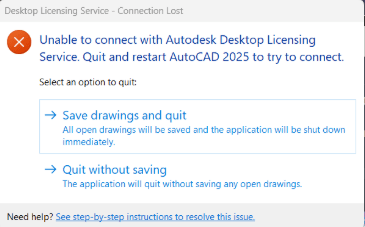


Figure 1


Causes:
Corrupted Visual C++


Solution:
Although there are other fixes for this issue. We have found recently Visual C++ 2012 forward have been corrupted.

  • Right click the Windows Start Button.
  • Select Installed Apps
  • Scroll down to Microsoft Visual C++.
  • Select Microsoft Visual C++ 2012 Redistributed (x64) and select the “…” to the right Select modify.
  • Then on the dialog box select repair.
  • Perform this for both x64 and x86 on 2012 forward.


Note: if one takes a long time this is normally the corrupted version.

About the Author

Jeff Arbogast

Manufacturing Solution Center Team Lead<br><br>Jeff is responsible for manufacturing Technical Support for both internal staff and customers. In addition to the daily activities of the support center, he helps write for the National Support Center blog, and has written online classes for the IMAGINiT training on demand site.

Follow on Linkedin More Content by Jeff Arbogast
Previous Article
How to silently install Autodesk Products updates

To install Autodesk updates silently, use the -q switch.

Next Article
Fixing Civil 3D “Drawing File is Write Protected”

Error: “Drawing file is write protected” even when: you have full permissions, no one else has the file ope...

Need tech support? Let us help!

Learn More