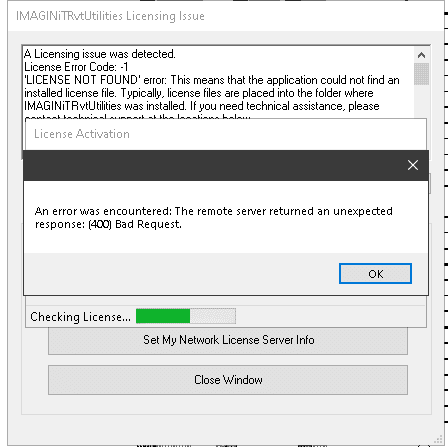
“An Error Was Encountered” with IMAGINiT Network Utilities License
When trying to activate or update an IMAGINiT Utilities License you receive the following error: "An Error Was Encountered"
Read
IMAGINiT Utilities: How to see if your dynamic port was successfully updated
Causes: You have set your dynamic port to static and would like to see if the new port is being seen.
Read
IMAGINiT Utilities: How to see if network licenses are available
Causes: You have set up the license manager and would like to know if the licenses are being seen and available.
Read
IMAGINiT Utilities: How to Authorize your IMAGINiT utilities (Client side)
When you install the Utilities on the user system. You will be asked to Authorize the Utilities
Read
IMAGINiT Utilities Reprise License Manager: How to Change default Port 27051
When using the Reprise License Manager with the IMAGINiT Utilities there are 4 ports that must be open. 5054, 5053, 27051
Read
IMAGINiT Utilities Reprise License Manager: How to hardcode the dynamic Port
When using the Reprise License Manager with the IMAGINiT Utilities there are 4 ports that must be open. 5054, 5053, 27051
Read
Top 5 IMAGINiT Utilities Features Revit Teams Love
Top 5 IMAGINiT Utilities for Revit that teams love—save time, improve model health, and streamline sheet, parameter, and data management.
Read
IMAGINiT Utilities for Revit: Merge Cleanup (NEW for 2026!)
The Merge Cleanup utility is designed to identify, compare, and consolidate duplicate or similar appearance elements in your Revit project.
Read
IMAGINiT Utilities for Revit: Project Cleaner
The Project Cleaner utility is a tool designed to help you systematically remove unwanted items from a model and establish repeatable cleanup settings.
Read
IMAGINiT Utilities for Revit: Element Compare - What's the Difference?
Whether you’re comparing view templates, wall types, or other elements, this tool provides the clarity you need to make informed decisions about your design data.
Read
Smarter Revit Model Management with the New Merge Cleanup Tool
Discover the new Merge Cleanup Tool in IMAGINiT Utilities for Revit 2026, designed to simplify model cleanup and improve performance. Watch the demo video.
Read
Installing IMAGINiT Utilities for Revit 2025
Here are the steps to follow to get an authcode and install the IMAGINiT Utilities for Revit 2025.
Read
IMAGINiT Utilities for Revit: Grid Select
The Grid Select tool allows users to isolate elements on specific grid lines quickly and efficiently, ensuring they have greater control over their views and selections.
Read
IMAGINiT Utilities for Revit: DWFplus
The DWFplus utility expands the capabilities of Revit’s standard DWF/DWFx export by allowing users to embed additional element parameters and view-specific metadata in their exported files.
Read


Follow on Linkedin More Content by Derek Piccininni


