Issue:
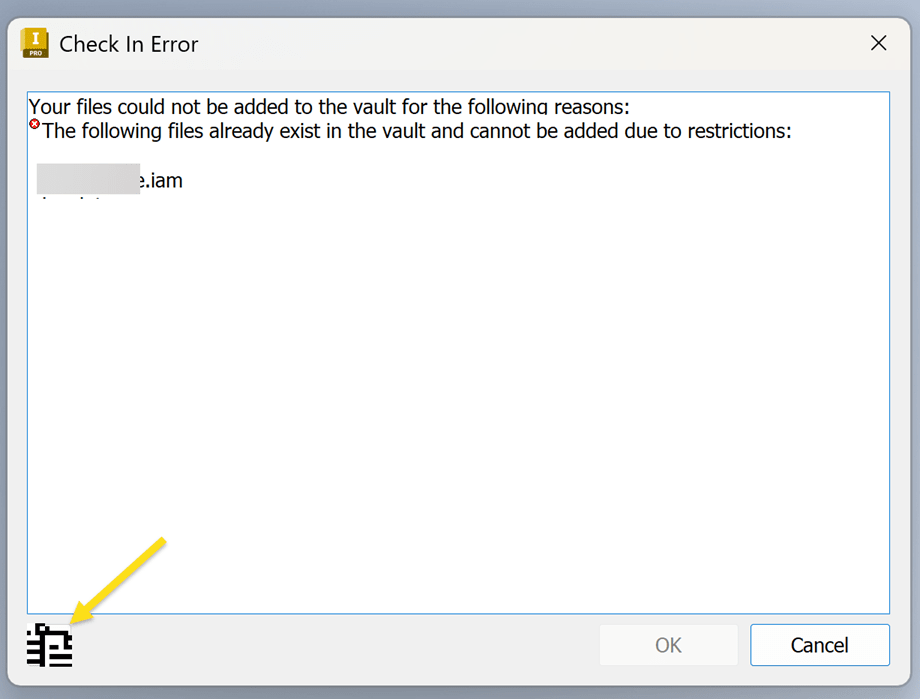
With 'Enforce unique file name' on in Vault, the Inventor Check-In Error dialog box no longer shows a tabulated list of files and a button to 'Copy to Clipboard' at the bottom left.
In Inventor 2024 and older, the message had a button to copy the list of files to the clipboard as well:
'Your files could not be added to the vault for the following reasons: The following file already exists in the vault and cannot be added due to restrictions:'
https://www.autodesk.com/support/technical/article/caas/sfdcarticles/sfdcarticles/The-following-file-already-exists-in-the-vault-and-cannot-be-added-due-to-restrictions.html
Cause:
This is being investigated by the Autodesk development team:
https://www.autodesk.com/support/technical/article/caas/sfdcarticles/sfdcarticles/The-dialog-no-longer-shows-the-list-of-duplicate-names-when-checking-duplicate-files-into-vault-from-Inventor-and-the-unique-file-names-is-tuned-on-in-Vault.html
Solution:
Currently the list of duplicate file(s) will appear one after the other at the end of the error when checking in an assembly.
Note down all the duplicate files manually before attempting to check in again.

More causes for a 'A file with this name already exists in the Vault' error:
https://www.autodesk.com/support/technical/article/caas/sfdcarticles/sfdcarticles/A-problem-occurred-while-attempting-to-add-A-file-with-this-name-already-exists-in-the-Vault-when-checking-in-Inventor-files-to-Vault.html
About the Author

Manufacturing Technical Support Specialist<br><br>Joanna has over eight years of experience working with Autodesk products. She started supporting core AutoCAD and network installations of all Autodesk products. She now has five years of experience with Inventor. <br>
She graduated from Mechanical Engineering and has been providing solutions to clients and dedicating her knowledge to the Solution Center since then.
More Content by Joanna Gryszka


