How to silently install Autodesk Products updates

Issue: 

I need to install Autodesk updates silently using a batch file.

Solution:

To install Autodesk updates silently, use the -q switch.

Create a batch file and point to the Autodesk update, and add the -q:

example: \\networkshare\foldername\AutoCAD_2026.1_Update.exe -q

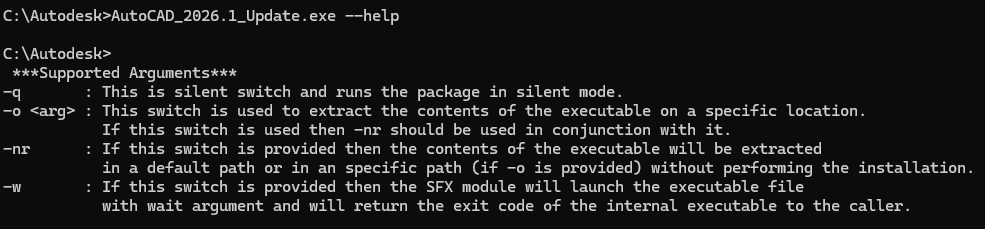
 Here are the switches\Arguments for Autodesk Updates:
About the Author

Ken Williams

Installation Technical Support Specialist<br><br>Ken Williams has over 20 years of experience as a systems administrator helping organizations with installation, configuration, and maintenance. At IMAGINiT, Ken puts his knowledge of Microsoft, SQL, servers, and Autodesk to work ensuring clients are able to stay up-and-running, install their software easily, and maintain their solutions.

Follow on Linkedin More Content by Ken Williams
Previous Article
From Markup to Multi-System Action: What the AEC/O Community Really Wants to Know About Bluebeam Max and Agentic AI

Bluebeam MAX uses AI and agentic workflows to automate tasks, connect project systems, and help AEC teams w...

Next Article
Eliminate Duplicate Entry and Improve Financial Visibility with IMAGINiT’s Forma–Yardi Connector

The Forma–Yardi Connector keeps Autodesk Forma and Yardi in sync, reducing manual entry and improving finan...

Need tech support? Let us help!

Learn More