

Issue:
After installing Inventor 2023 launching DWG True View results in a ‘Sorry, this pre-release product has expired.’ error.
Causes:
The DWG True View 2023 install or user premissions can cause the error.
See the reference Autodesk article:https://www.autodesk.com/support/technical/article/caas/sfdcarticles/sfdcarticles/sorry-this-pre-release-product-has-expired-when-launching-DWG-TrueView-that-was-installed-with-Vault.html
Solution:
Uninstall DWG True View 2023
- From Windows Control Panel:
- Or from the Autodesk Uninstaller file(if it exists) in C:\ProgramData\Autodesk\Uninstallers\Autodesk DWG TrueView 2023 – English
- Or use the Microsoft Fix It Tool to uninstall: https://resources.imaginit.com/support-blog/how-to-use-the-microsoft-fix-it-tool-for-autodesk-software
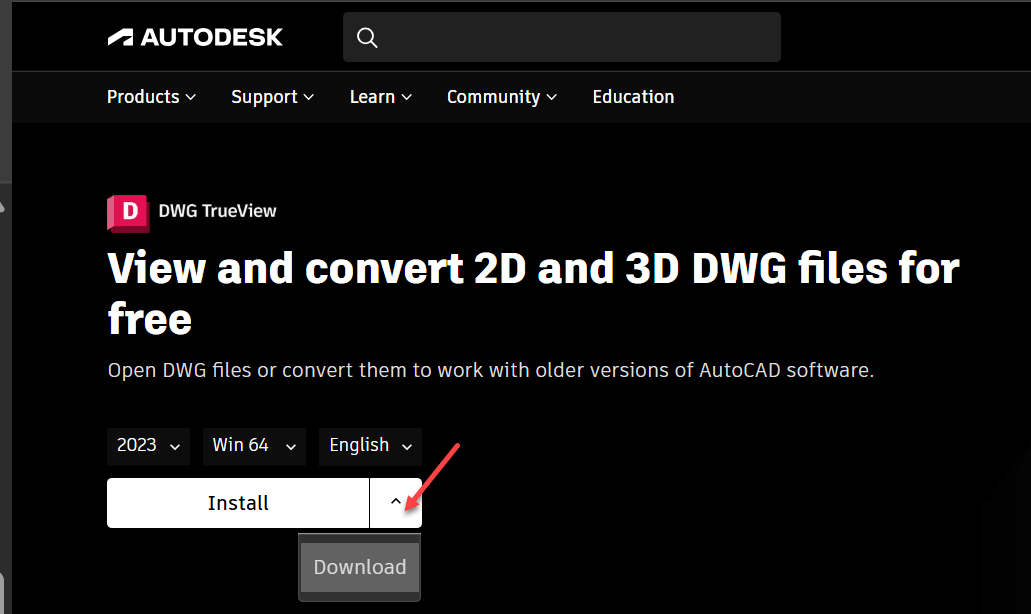
Download the latest DWG True View 2023 installer
From the Autodesk Viewers download site: https://www.autodesk.com/viewers
Select the Install or Download option. Install DWG True View from the downloaded installer.
About the Author
More Content by Joanna Gryszka


