

Issue:
Launching AutoCAD 2025 will produce two errors and fail to successfully open. This behavior occurs after installing updates for Vault Client 2025.
Note: If you have having this issue with 2026 AutoCAD based products, please see my teamate Shawn Heator's blog for that version - https://resources.imaginit.com/support-blog/autocad-2026-exception-and-fatal-error
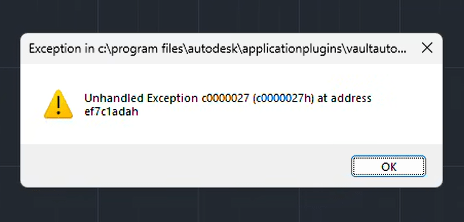
The first error is an “Exception” and points to VaultAutoCAD2025.bundle.
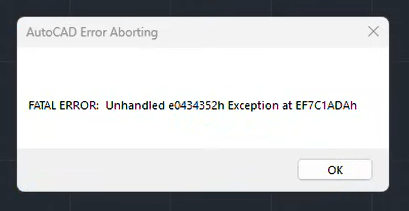
The second error is a Fatal Error with an Unhandled Exception.
Causes:
The problem occurs because Vault Client 2025.5 update is installed but the AutoCAD 2025.1.4 update is not installed. The AutoCAD 2025.1.4 update is required to maintain AutoCAD and Vault functionality.
Solution:
The solution is to download and install AutoCAD 2025.1.2 update.
AutoCAD updates can be downloaded and installed from Autodesk Access, from your Autodesk account at https://manage.autodesk.com, or from the hyperlink below.
AutoCAD 2025.1.4 update
Follow the instructions below to download from your Autodesk account.
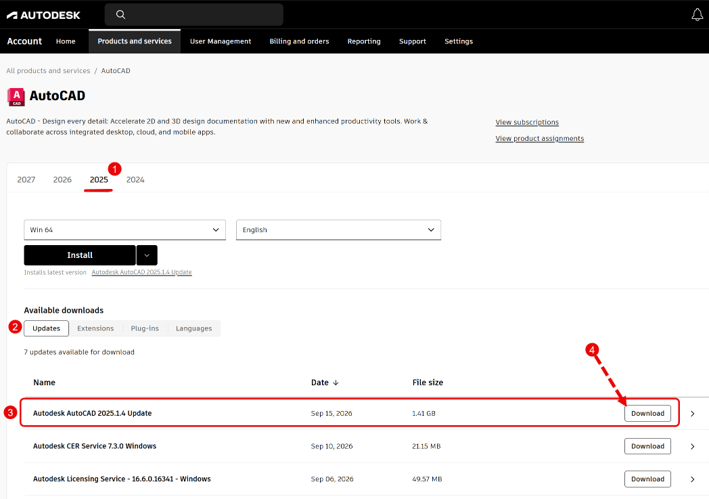
1. Open a web browser and go to https://manage.autodesk.com.
2. Go to Products and Services.
3. Find AutoCAD and select “View Details.

4. Select 2025 to view updates specific to AutoCAD 2025.
5. Look toward the bottom of the screen to find Autodesk AutoCAD 2025.1.4 Update. Select Download.
6. When the download completes, run the download to install the update.

Follow the prompts to install the update. Once the update is installed, launch AutoCAD 2025 and there should no longer be any errors.
About the Author
Follow on Linkedin More Content by Heath White


