Revit Project North Set up Issue

Issue:
When setting up Project North in Revit, the command fails and the model will not rotate.
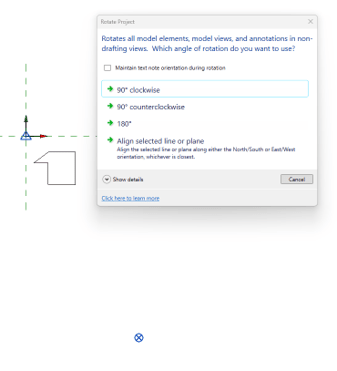
 

Nothing happens when a selection is made from the options.

Causes:
Project file corruption can cause command failures, such as issues when setting up Project North.

Solution:
Detach the file and run an audit.


If the file is a Forma project, the model must be detached from the Forma server and reuploaded after auditing the file.

About the Author

Gregory Lee

Sr Technical Support Specialist<br><br> Skilled in AutoCAD, Mixed-use, Renovation, Revit, and Sustainable Design. Strong arts and design professional with a BA in Urban design focused in Architecture from University of Washington.

Follow on Linkedin More Content by Gregory Lee
Previous Article
Revit Project File Version Unknown

Revit file shows the version number is not known. The zip file extension was changed to zip.

Next Article
Autodesk Error: The required component Autodesk RealDWG Shared is missing or improperly installed.

When opening Revit you receive the following error message.

Revit Classes Now Available

Check Schedule