

Issue:
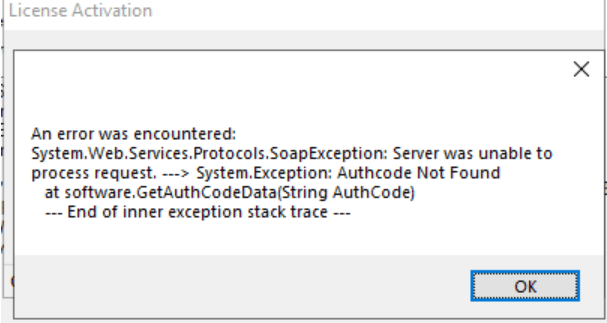
When trying to activate or update an Imaginit Utilities License you receive the following error:
Causes:
The issue is caused by an additional whitespace in the activation code, typically at the front of the code and often caused by “Copy/Paste” picking up an unnoticed “blank/whitespace.”
Solution:
Carefully copy the code and inspect the pasted code to see if a space can be deleted from the submission box. It often helps if you use a plain text editor such as Notepad or Notepad++ to avoid any unwanted formatting being added inadvertently. And, as always, if you are stuck, please don’t hesitate to contact us via support@rand.com
About the Author
Follow on Linkedin More Content by Heath White


![Vehicle Tracking: “Failed to retrieve a Vehicle tracking license [Error Code -3]](https://content.cdntwrk.com/mediaproxy?url=https%3A%2F%2Fres.cloudinary.com%2Fuf-554092%2Fimage%2Fupload%2Fv1743601839%2FENH_AdobeStock_144632327_1_rpuoqp.jpg&size=1&version=1760657444&sig=efdcd313a7f1e5a0503a6b6e23b34c8e&default=)


