P&ID Tag shift in Cloud Projects

Issue:
When opening a Plant 3D P&ID file from a cloud project, the tag text and/or instrumentation bubble text may shift. This behavior is intermittent and does not occur every time the P&ID file is opened.
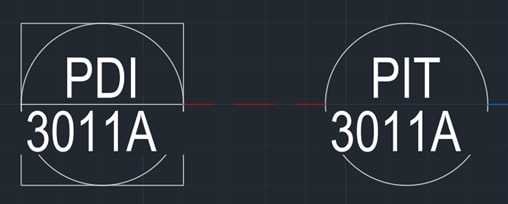
 
 
Example of the text shift in instrumentation bubbles


Causes:
This is a known defect in AutoCAD Plant 3D 2026 when opening P&ID files in ACC, and it is currently under investigation. The Autodesk defect number is PLANT 35235.

Solution:
The only fix is to manually update the tags and instrumentation bubbles. For instrumentation bubbles, you can either adjust the properties directly or right click the assigned tag, change its value, and then change it back. For tags, move the tag that shifted—unless it’s a multi line tag, in which case follow the same steps used for the instrumentation bubble.

About the Author

Paul Sills

Sr. Support Specialist<br><br>Paul is responsible for client technical support as well as the set-up and configuring of plotters; support and service calls; and the installation, demonstration, and education of clients in AutoCAD, AutoCAD Architecture, AutoCAD MEP, AutoCAD P&ID, Advance Steel, Navisworks, Raster Design, Revit Architecture, Revit MEP, Revit Structure and 3D Studio MAX. He draws upon his years of experience as a technical engineer to assist customers in the creation and implementation of standards, the set-up of plotter and pen styles and the creation of custom blocks.

Follow on Linkedin More Content by Paul Sills
Previous Article
How to add automatic scale fields to viewports in AutoCAD

When working on AutoCAD drawings or creating drawing templates, especially for drawing sheets with large nu...

Next Article
AcDbSpatialIndex Error and How to Fix It

Issue: Running Recover on a drawing shows an AcDbSpatialIndex error was present and repaired:

What's New in
AutoCAD 2027

April 17

Register Now