Issue:
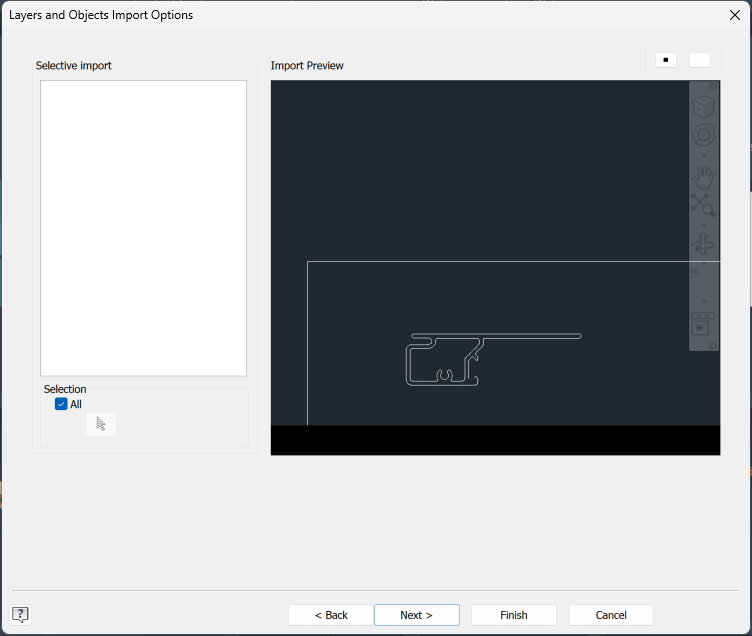
Selective import is blank when importing an AutoCAD DWG into an Inventor 2026 sketch or importing the DWG.
No layers are listed to choose from:
Cause:
Missing Inventor updates.
The issue can be caused by the presence of Regions or 3D Solids in the AutoCAD DWG file as well. :
https://www.autodesk.com/support/technical/article/caas/sfdcarticles/sfdcarticles/DWG-files-with-solids-cannot-be-imported-in-Inventor-2026-on-German-Windows.html
Or a problem with the DWG True View install:
https://www.autodesk.com/support/technical/article/caas/sfdcarticles/sfdcarticles/No-layer-control-and-no-selective-import-when-inserting-DWG-files-in-Inventor.html
Solution:
This is resolved in the Inventor 2026.3 update.
Install the Inventor 2026.3 update from Autodesk Access or your Autodesk Account.
About the Author

Manufacturing Technical Support Specialist<br><br>Joanna has over eight years of experience working with Autodesk products. She started supporting core AutoCAD and network installations of all Autodesk products. She now has five years of experience with Inventor. <br>
She graduated from Mechanical Engineering and has been providing solutions to clients and dedicating her knowledge to the Solution Center since then.
More Content by Joanna Gryszka