

Issue:
How to get the direct download of your assigned Autodesk products for an offline installer.
Solution:
- Go to manage.autodesk.com and log in.
- After you log in, choose “All Products and Services”at the top of the page.

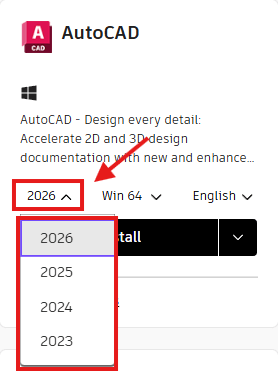
- Choose the product you will be downloading and then click on the drop-down for the version. Choose the version that you need to download.
4. After choosing the version, click the View details button below the Install Button. 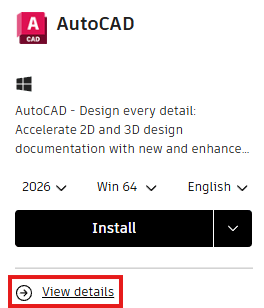
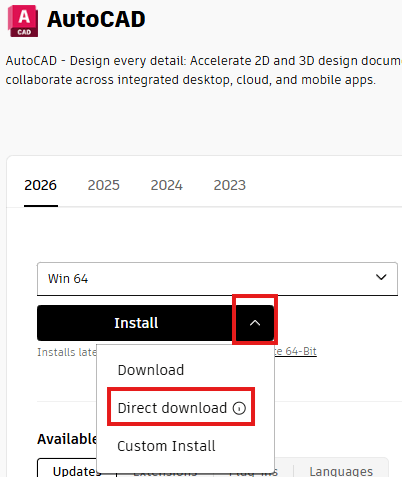
5. After choosing View details, you should be directed to a new page. To the right of the Install button, click the dropdown arrow. In the drop-down, click Direct download.
6. A download message should pop up in your browser window. This pop-up should say that 2 files will be downloaded.
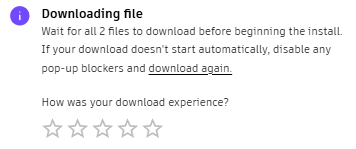
7. If only 1 file downloads, you will need to turn off the browser pop-up blockers. Follow this blog to disable your browser pop-up blockers, then click “Start Download” again.
8. When the download(s) complete, go to your download folder.
9. Once inside the downloads folder, you should see the 2 files. 1 file will be an .exe, and the name should end with _001_002.exe. The other file will be a .7z or zip file. This file's name will end with _002_002.7z. Click on the file that ends with 001_002.exe to extract.
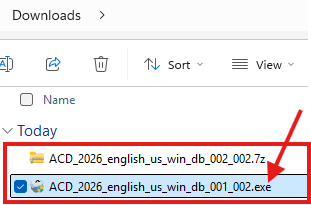
10. The Autodesk Self-Extract tool will start.
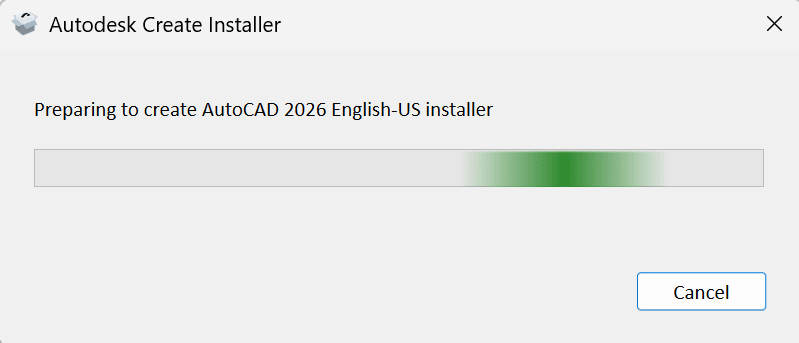
11. When the tool is done extracting, you can either Open in folder or Run Installer.
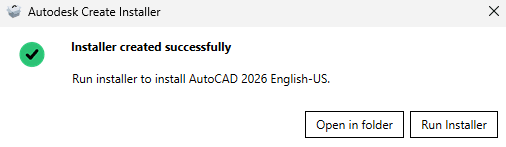
12. The installation files will be in the C:\Autodesk\WI folder. For this example using Autocad 2026 the folder is C:\Autodesk\WI\ACD_2026_english_us_win_db_002_002
About the Author
Follow on Linkedin More Content by Ken Williams


