Issue:
Saving edits to a custom Content Center family in Vault results in a ‘Failed to publish to the selected library.’ error:
Causes:
The error can be caused by several known issues documented here: Failed to publish to the selected library error.
Some can be resolved by installing the latest Vault Client and Server updates and following the update Read Me to ensure they’re properly installed.
If the Vault updates don’t get rid of the error, there are some workarounds available:
- Vault 2022-issue reported with Incident ID:58270
- Vault 2020-2022-resolved with updates
- Vault 2020-resolved in Vault 2020.3.3 Update
Solution:
First install all Inventor and Vault updates.
1. Transfer the Content Center library from Vault to Desktop Content(IDCL) and ensure you have a backup of the Vault Content Center Library.
2. Change the Content Center library access to Inventor Desktop Content in Application Options. Test saving Content Center library changes to the Inventor Desktop Content library.
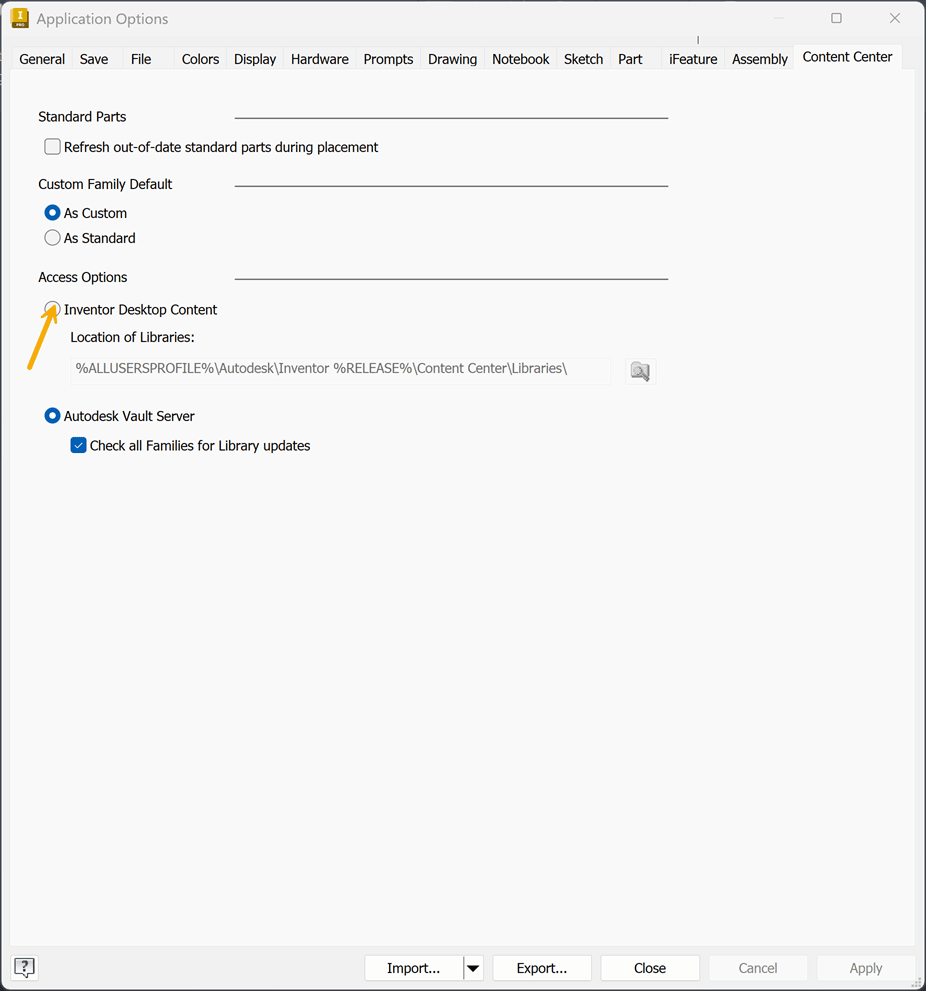
3. Delete the library in Vault and transfer the Inventor Desktop Content library to Vault.
- Test saving your Content Center family edits to the Vault Content Center.
4. If the error persists with the library in Vault, consider using Desktop Content instead of Vault libraries. Or perform library edits in Desktop Content and transfer to Vault.
-
If sharing Desktop Content on the network, library permissions are managed through Windows network permissions.
For more help troubleshooting the error contact Imaginit Support or email support@rand.com.
About the Author
More Content by Joanna Gryszka