

If you work extensively in Microsoft Outlook, you know how distracting it can be to toggle between email and other applications. This is particularly true with Autodesk Forma.
Whether you’re a project administrator, work in cost management, or just someone who uses Forma on a routine basis, it takes multiple steps and lots of context switching to save an email to a Forma folder, create a Forma issue or RFI from information in an email message, file an email to Forma correspondence, and more.
Enter IMAGINiT Accelerate Inbox – a new offering that’s part of IMAGINiT’s family of Forma Automation Tools. IMAGINiT Accelerate Inbox helps users move email-based workflows forward in Autodesk Forma – without ever leaving the Outlook interface.
This Microsoft Outlook add-in appears as a handy sidebar that runs right in Outlook. Once you sign into Forma in the sidebar, you are ready to keep email-driven project tasks moving quickly, consistently, and accurately.
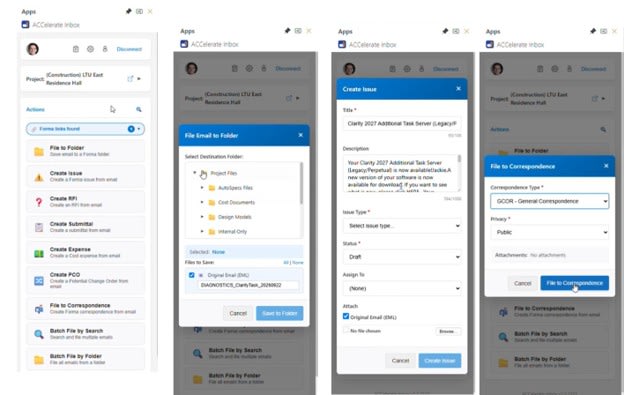
With IMAGINiT Accelerate Inbox, you can:
• File emails and attachments into Forma folders. As files and attachments come in via email, add or update them in Forma Docs.
• Create new Forma items from emails. Transform incoming emails into issues, RFIs, submittals, change orders, expenses, and more in the appropriate Forma project.
• Become a master of Forma Correspondence. Easily file incoming emails in Forma Correspondence. Set up automatic filing by folder, then search or batch files to get caught up.
• Search and update existing Forma items. Find existing issues, RFIs, submittals, and files. Then use quick methods for in-place updates or workflow advances.
• Compose emails with integrated tools. Write emails better and faster with tools that look up project members, insert links or files, and more.
IMAGINiT Accelerate Inbox saves time, increases operational efficiency, improves consistency and accuracy, and enhances project visibility. It’s time to stop switching, copying, and pasting, and start thinking and acting.
To learn more about IMAGINiT Accelerate Inbox or to request a demo, contact us.


