Revit Version: Applied to all Revit versions.
Issue:
Revit model is available on Forma Data Management page, but does not show up in the folder when user try to link
Causes:
There are two different methods to upload the Revit file to Forma.
- Initiation via Revit: This uploading method allows user to upload the Revit file to cloud and able to work with file in the cloud environment with other team members using design collaboration
- Direct upload to Data Management: This uploading method is for user who is not participating in Forma design collaboration. File uploaded directly to the Data Management site.
Linking method will vary depending on the file’s uploading method. If a file was uploaded using initiation, user can simply insert a Revit file from the dialog. However, if file is uploaded directly to Data Management site, user can’t see the uploaded Revit file from the dialogue window.
Solution:
In order to link the Revit file that was uploaded directly to Data Management site, user needs to utilize the Autodesk Desktop Connector.
Select Autodesk Forma from the drop down menu instead of External Resource.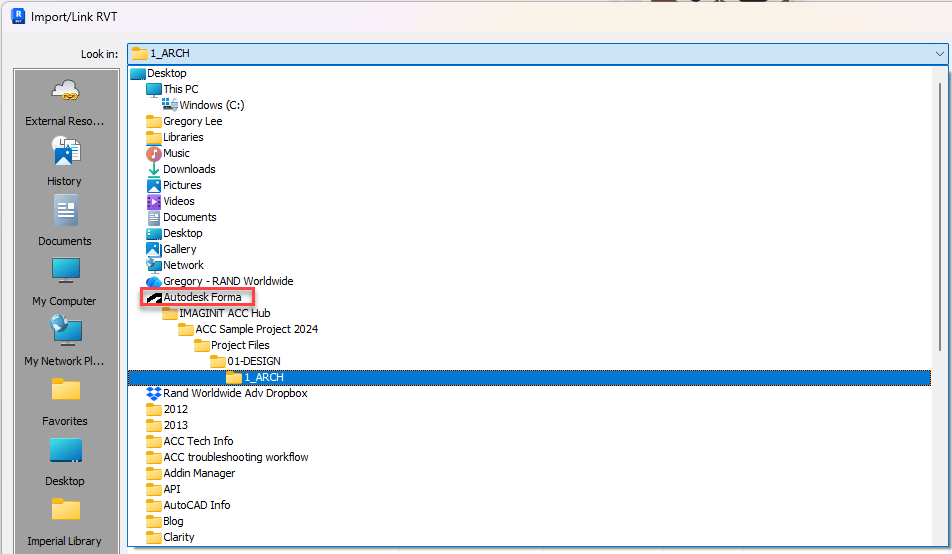
The file will be visible when you navigate to the source folder where it wasn’t visible from External Resources.
Select the file and link into the project model.
Additional References:
Autodesk Construction Cloud Best Practice Part 3 – Understanding Server Structure
Autodesk Desktop Connector Best Practice
About the Author
Follow on Linkedin More Content by Gregory Lee