

A new software rollout can change how teams are expected to work overnight. Building the skills to use that software well takes longer. A new Revit user needs to learn the tools, find the firm’s modeling standards, and know how to check a model before sharing it. If the answer to each question lives with the same senior specialist, every interruption takes time away from project work.
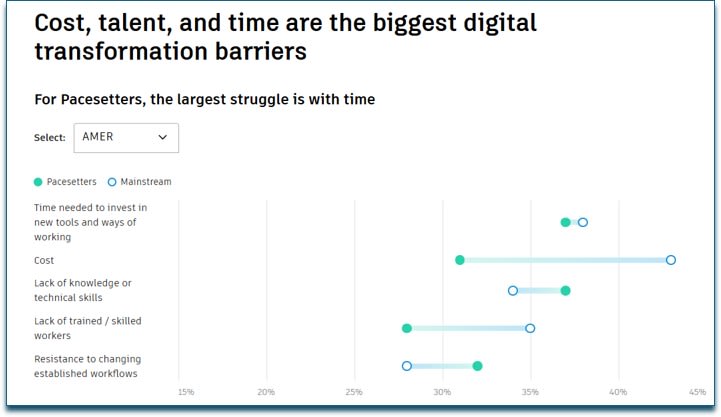
Autodesk’s 2027 State of Design & Make report puts numbers to that challenge. In a global study of 5,500 leaders and experts, 56% cited at least one skills-related barrier to digital transformation, while 37% cited cost. Three-quarters of organizations plan to increase AI investment over the next three years, making it even more important to develop the judgment employees need to check AI-generated output against project requirements and company standards. Read the findings on digital maturity and AI adoption.
Four ways to make learning part of project delivery
Applied learning connects training to the tasks employees are expected to perform. For managers, it starts with defining what proficiency looks like and continues through the way teams use and reinforce those skills on projects.
1. Identify the skills each role needs. Define what people should be able to do independently, then assess where they need practice. A Civil 3D designer might need to build and check a corridor model, while a project lead needs to review it for compliance with project standards. Use those differences to assign training and reassess progress.
2. Make answers available during project work. Give employees a way to find a short lesson or workflow guide when they encounter an unfamiliar task. A designer who needs to refresh a procedure can get the answer while the project is open and apply it right away.
3. Capture how your company works. Ask experienced staff to document the templates, workflows, and quality checks they use. Make that guidance easy to find alongside software training so employees can apply the right procedure for their firm. Include who reviews AI-assisted work and what they check before it goes into a deliverable.
4. Measure whether skills carry over to the job. Track assessments and learning progress alongside a project measure tied to your goal, such as time to complete a first assignment independently, recurring support requests, or rework flagged during quality reviews. Use the results to decide what to reinforce before the next rollout.
Build the foundation in class and reinforce it with ProductivityNOW
IMAGINiT’s instructor-led training classes give teams dedicated time to learn a workflow, practice with hands-on exercises, and ask questions as they work through it. Instructor led training options support needs ranging from software fundamentals for new hires to advanced workflows for experienced users. Browse the instructor-led class schedule.
ProductivityNOW, IMAGINiT’s eLearning and support platform, extends that learning into the workday. Employees can access self-paced courses and bite-sized lessons around the clock. Role-based learning paths, knowledge assessments, and progress tracking help managers assign training based on skill gaps. AI-powered search and the Microsoft Teams integration help employees find relevant learning resources during project work. Organizations can also make their own procedures and standards available alongside training content. Explore ProductivityNOW.
For example, a new Revit user could take an instructor-led fundamentals class, then follow a ProductivityNOW learning path for their role. On their first project, they can revisit a modeling exercise and consult the firm’s model setup checklist. Their manager can review learning progress and use the first model review to see which skills need more practice.
What customers are saying:
At Environmental Design Group, on-demand training helped employees build skills while keeping projects moving.
“ProductivityNOW has made a big difference to our company. The 24/7 access to self-paced training courses has made it easy for users to gain the skills they need to become more efficient, keep projects moving along smoothly, and deliver better results to clients.” - Hunter Darbin, Associate Project Manager, Environmental Design Group
Read the Environmental Design Group case study.
Cleveland Construction reported two gains after giving employees access to self-service learning and IMAGINiT technical support through chat, support cases, or phone.
• 30% less time looking for answers to Autodesk Forma workflow questions, helping employees resolve questions and return to their work sooner.
• 25% less time spent on internal software support, freeing in-house power users from routine questions so they could focus on other responsibilities.
Read the Cleveland Construction case study.
Register for our upcoming webinar in collaboration with Eagle Point Software to learn more. Close Skills Gaps to Build a More Capable Workforce


