When we hosted our webinar on Bluebeam Max and Agentic AI, we knew the audience would be curious. What we did not fully anticipate was the depth and urgency of the questions. More than 70 came in during the session, ranging from basic setup questions to sophisticated inquiries about AI reasoning, data sovereignty, and multi-system orchestration.

Together, Rick Kremer and Tom Coons walked our attendees through two live demos that covered two distinct but connected stories.
- First, what Bluebeam Max can do on its own: a dramatically upgraded version of Revu with built-in AI capabilities, real-time Revit sync, and field inspection integration.
- Second, what becomes possible when you connect Max to a broader agentic AI stack, where a single markup in Revu can automatically trigger actions across GoCanvas, Autodesk Revit, and Autodesk Fusion Manage simultaneously to demonstrate the end-to-end capability.
This blog answers the questions from that session into a guide for AEC/O professionals trying to figure out where this technology fits in their practice and how to get started.
What Is Bluebeam Max, and What Makes It Different?
Bluebeam Max is Bluebeam's most advanced version of Revu, and its defining feature is a built-in MCP (Model Context Protocol) integration. If you are unfamiliar with MCP, the best analogy is a USB-C port. Just as USB-C is a universal connector standard that lets any compliant device plug into any compliant machine, MCP is a standardized communication framework that allows AI agents and external tools to connect without custom code for every integration.
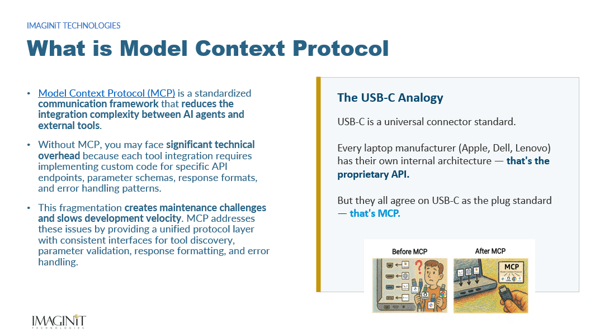
Before MCP, connecting an AI to a tool like Bluebeam would require implementing custom API endpoints, parameter schemas, response formats, and error handling for every combination. MCP eliminates that fragmentation by providing a unified protocol layer. Bluebeam Max implements that protocol on the Revu side, and Claude, Anthropic’s AI platform, implements it on the AI side. The result is a live, bidirectional connection between your active PDF session and an AI reasoning engine.
This MCP integration is exclusive to the MAX version of Revu. Earlier versions do not have access to these capabilities. Rick demonstrated the following live:
Core Max Capabilities Demonstrated in the Webinar
- Natural language AI prompts to extract meaningful insights directly from your PDFs, reading markup data, text layers, and annotation properties without uploading any files
- Real-time Revit sync: Connected Studio Sessions let markups flow between Revu and Autodesk Revit in real time, appearing on the correct sheet and floor plan view, including in 3D
- Automated multi-sheet Stitching for a complete, unified view of your project across drawing sets
- Smart Overlay and Smart Review: AI-powered drawing comparison tools that identify design changes across revisions and run automated plan checks
The Agentic AI Demo: One Markup, Four Systems
Tom demonstrated a live end-to-end agentic AI workflow that is described as a game changer. The premise was straightforward: what happens when a single Bluebeam Max markup triggers a coordinated sequence of actions across every major system on a construction project?
A single markup in Bluebeam MAX automatically triggered:
- A field inspection in GoCanvas, dispatched to the appropriate crew with the relevant form pre-populated
- A BIM update in Autodesk Revit, writing information back into the model at the exact element location
- A warranty-related request in Autodesk Fusion Manage, creating a formal record tied to the affected asset
- Automatic cross-references between all three systems, maintaining full traceability from the drawing markup to the field record to the asset management system
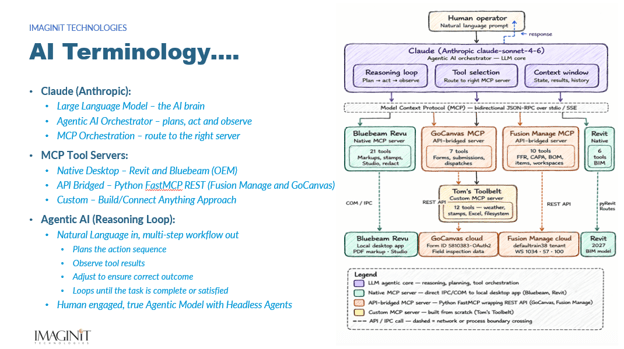
This is what agentic AI means in practice. It is not a chatbot that answers questions. It is an orchestration layer that plans a multi-step action sequence, routes each step to the right system via MCP, observes the results, adjusts if something does not complete correctly, and loops until the task is done. Claude serves as the AI brain and orchestrator. The MCP servers for Revit and Bluebeam are native desktop integrations built by Autodesk and Bluebeam respectively. The connections to Fusion Manage and GoCanvas run through Python FastMCP REST bridges. And a custom server handles weather, stamps, file utilities, and other supporting tasks. IMAGINiT can assist you or your end customer with any custom MCP servers needed to optimize your workflow.
The architecture demonstrates a five-server MCP stack, with a sixth RAG and semantic search server in development. For AEC/O firms, this represents a blueprint for how AI orchestration can eventually span the full project lifecycle, from design and documentation through field execution and asset management.
What Does This Actually Cost?
Bluebeam MAX requires two subscriptions:
- Bluebeam Max: required for the MCP server on the Revu side. Pricing is available through IMAGINiT.
- Claude Desktop from Anthropic: required as the AI client that connects to Bluebeam Max. The free tier technically works but hits rate limits quickly on larger markup sets. Claude Pro at $20 per month is the practical minimum for production use. The Max plan is recommended for heavy, repeated sessions like client reviews.
For firm-wide deployment, Anthropic offers a Claude for Teams plan with centralized billing and administration. Each user who wants to run Claude and Bluebeam Max workflows will need their own Claude account and the desktop app installed locally, since the MCP connection is established on each user's machine.
Setup note: MCP must be manually enabled within Bluebeam's Preferences > Admin > MCP settings. Once enabled, all available Claude tools appear under Settings > Connectors > Bluebeam Local Dev in the Claude desktop app.
For optimal workflow adding GoCanvas is suggested. GoCanvas Task Link: natively integrated into Revu for office and field workflows. Pricing for GoCanvas is available through IMAGINiT.
Data Security: The Question Behind Every Question
Here is the architecture as it stands today. The Bluebeam Maxand Claude integration works through MCP locally. Claude reads markup metadata from your active Revu session on your machine. No PDF files travel to Anthropic's servers. Only structured data, including text fields, coordinates, authors, and status values, passes as conversation context.
That said, the conversation context does travel to Anthropic and is subject to their data handling policies. Bluebeam's own AI transparency policy is published HERE.
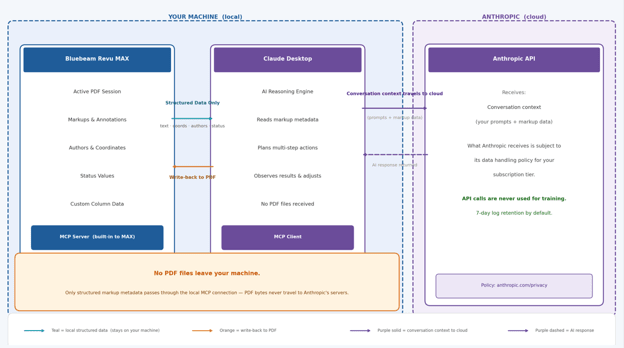
For projects with strict confidentiality requirements, review both policies with your legal and IT teams before deploying Max features on sensitive content. For federally regulated projects, the question of FedRAMP compliance for Bluebeam Max's web components should be directed to Bluebeam directly.
What Can Claude Actually Do Inside Revu?
The demo covered a wide range of workflows, and the audience ran with them. Here is a summary organized by what is confirmed, what is limited, and what is on the near-term roadmap.
Confirmed Capabilities
- Read and classify all markup data from an active PDF, including author, type, subject, comment, coordinates, and custom column values
- Extract the underlying text layer of a PDF using the “save_as_text” tool, enabling cross-referencing of markup comments against specification sections and flagging of contradictions by trade
- Conflict detection: Claude identifies incompatible markup conditions across disciplines, such as dimension discrepancies between structural and architectural markups or MEP elements conflicting with structural notes. Conflict criteria can be tuned in the prompt, for example focusing only on life safety or ADA items
- ADA compliance review: evaluating markup data against ADA criteria is one of the most reliable and repeatable use cases in the current toolset
- Quantity takeoffs: Claude counts and categorizes markups on demand using natural language, as a complement to Bluebeam's native QtyLink feature
- Specification review: cross-referencing markup annotations against embedded spec sections in the same PDF, flagging where field notes contradict written requirements
- Comparative compliance: combining Bluebeam's Document Compare tool with Claude's reasoning to evaluate which delta markups between two PDF versions represent compliance issues against code criteria provided in the prompt
- Markup deletion by status or custom column value, enabling iterative QC workflows such as removing completed items and transferring open items to a new background PDF
- RFI response drafting: pulling markup data and document text into context, drafting the response, and writing it back as a markup comment directly in Revu
- Room data extraction: extracting room names, numbers, and square footages from the text layer and organizing them into a clean table
Current Limitations Worth Noting
- Claude is not a visual interpreter of drawing content. It reads markup metadata and the PDF text layer, but it cannot distinguish between a wall and a line or reliably identify graphic elements that have no text behind them. OCR is improving, but visual understanding of drawing geometry is not yet reliable
- Cost estimates are directional, not bid-ready. Claude draws on training data including RSMeans-style benchmarks, not live pricing databases. Validate against current RSMeans, Gordian, or vendor pricing for production use
- The conflict summary report generated in the demo does not yet embed deep links back to individual markups in the Revu session. That capability is on the near-term roadmap
- Tool Chest creation and custom line type development are not yet within Claude's reach via MCP. Those live in Revu's profile and settings layer, not the document markup layer
- Stitched drawings are new unlinked PDFs. Markups added to a stitched document do not propagate back to the original source sheets
- Scanned legacy drawings cannot be visually enhanced by Claude. Revu's built-in OCR tool adds a searchable text layer that Claude can then read, but linework quality is not improved
The Revit Integration: How Deep Does It Go?
Several attendees were asking about Autodesk Revit connectivity and what a three-way integration between Bluebeam, Revit, and Claude might look like. The demo showed the answer clearly.
The Bluebeam Max Revit plugin currently supports Revit 2024 and up, with Connected Session features released alongside Revit 2026. The plugin works on any Revit project whether it is a local file, on your server, or managed through BIM Collab Pro. Markups created in a Bluebeam session tied to a Revit project appear on the corresponding sheet and floor plan view, positioned at the floor level where they were created. 3D markups are supported.
The Revit integration is specific to Autodesk Revit. It is not currently available for Civil 3D or AutoCAD Plant 3D.
The full vision, using Claude as the middleware layer communicating between Bluebeam, Revit, Fusion Manage, and GoCanvas simultaneously, was demonstrated live in the webinar with some pre-production code (safe harbor). Autodesk is releasing its own AI features in Revit, and the question of how those features interact with Claude via MCP will define a significant portion of the AEC/O technology conversation over the next year.
Claude Only? What About Copilot, ChatGPT, and Grok?
The answer is straightforward today: Claude is the only MCP-enabled AI LLM that currently connects to and is certified with Bluebeam Revu Max. Microsoft Copilot and ChatGPT do not have MCP client support for Revu currently.
MCP is an open standard, so in principle any AI that implements an MCP client could connect to the Bluebeam MCP server. OpenAI, Grok and Microsoft would need to build that client-side support. Watch Bluebeam's Max release notes and OpenAI's connector ecosystem for future developments.
One attendee noted that Bluebeam itself has enabled MCP as an integration layer, and is now essentially waiting for the major AI platforms to plug in. That framing is accurate. Claude got there first and is the demonstrated and supported partner today.
The Human Judgment Question
One of the most thoughtful questions was about double-counting in takeoffs. If you ask Claude to count diffusers across a PDF that contains both overall plans and partial plans with overlapping coverage areas, how do you know it will not count the same diffuser twice?
The honest answer is that it might, if you do not structure the workflow carefully. Claude is a powerful reasoning engine, but it does not yet carry the field experience that tells an estimator to ignore the partial plan on sheet A4.2 when doing a takeoff from the overall plan on A4.1. The practical approach demonstrated was running the Revu search feature per sheet, avoiding duplication at the source. Claude then works on each sheet's markup set independently.
This is the right mental model for agentic AI in AEC right now: Claude is a tireless first-pass assistant that accelerates your review and catches things you might miss, paired with the domain judgment you have built over a career. The combination is more powerful than either alone.
Workflows That Generated the Most Energy
Beyond the architecture questions, certain workflow demonstrations clearly landed differently than others. These generated the most follow-up questions and visible excitement:
- ADA compliance review: asking Claude to evaluate markup data against ADA criteria, producing a structured list of potential issues by location and element type
- Iterative mechanical QC: reading all markups, identifying completed items by status field, deleting them, and transferring non-completed markups to a new updated PDF background, dramatically reducing the manual labor in design iteration cycles
- Clash detection workflow integration: for attendees already using Claude to analyze Navisworks clash detection reports, the Max write-back capability was the key upgrade. Claude can now push RFI drafts and resolution notes directly back into the PDF, not just read from it
- Specification compliance cross-reference: two documents open simultaneously, Document Compare generating a delta markup set, Claude evaluating which changes represent spec compliance issues against criteria defined in the prompt
- Full end-to-end agentic workflow: the single-markup-to-four-systems demonstration that connected Bluebeam, GoCanvas, Revit, and Fusion Manage in a single orchestrated sequence, showing what traceability looks like when every system is connected
Where This Is All Headed
Think of what you saw in this webinar as version 1.0 of AI integration with Revu Max. The foundation is solid: a local MCP connection, bidirectional read and write capability, and a reasoning engine that understands AEC/O domain context.
The firms that will benefit most are those that start experimenting now. You do not need a fully mapped workflow on day one. You need a single use case, one curious person, and a Claude Pro subscription. From there, the learning compounds quickly and you can become a leader in AI.
The question is not whether agentic AI will reshape how AEC projects are documented, coordinated, and delivered. The question is which firms will be leading that change and which will be catching up? The ones that are leading the charge can change their business for the better.
Request a Personalized Demo
IMAGINiT is platinum Autodesk and Bluebeam/GoCanvas partner and a hands-on practitioner of the agentic AI workflows described in this post. Whether you are evaluating Bluebeam Max for your firm or ready to start building AI-assisted workflows today, contact us today for a demo.

Rick Kremer is IMAGINiT's Bluebeam Program Manager, Rick leads the strategy, enablement, and oversight of Bluebeam programs supporting construction clients nationwide. With 30+ years in commercial design and architecture and over a decade in the Autodesk and Bluebeam channel, Rick is a Bluebeam Certified Instructor known for translating complex technology into practical solutions that drive adoption, efficiency, and collaboration.

Tom Coons has over 25 years of enterprise technology experience spanning software engineering, global IT, and high-growth sales. At MAGINiT Technologies, Tom currently serves as the North America Enterprise Executive overseeing a significant Autodesk/Bluebeam ACV portfolio. Tom holds U.S. Patents, earned his M.S. in Information Technology, and holds accountability for the GoCanvas/SiteDocs business unit at IMAGINiT. He is passionate about digitally transforming organizations through disruptive technologies and brings a rare blend of engineering depth and commercial execution to every customer relationship.